
Old college address full of spam, secondary account untouched since 2018, team inbox of a salesperson who left, disposable alias created for a test: there comes a time to clean up Gmail accounts. But in 2026, “delete” covers five very different operations, and confusing them leads either to losing important emails or to deleting nothing at all.
Worse, Google tightened its inactivity policy in December 2023: any Google account inactive for 2 years can be automatically deleted by Google, which also deletes its Gmail address, its Google Photos photos, its Drive files and all its history. Many people discover in 2026 that secondary accounts they thought were just “sleeping” have actually been erased without sufficient warning.
This guide explains in 2026: the difference between the 5 types of deletion (remove from device, delete the Gmail service alone, delete the entire Google account, automatic deletion for inactivity, deletion by a Workspace admin), the step-by-step procedure for each case, the mandatory backups before action, the recovery windows, the impact on connected services, and the implications for a sales team managing multiple sending mailboxes.
What you’ll find:
- The 5 types of Gmail account deletion and their differences
- The Google Takeout backup step by step
- The permanent deletion procedure and the recovery window
- The Google 2-year inactivity policy (since 2023)
- Team management under Google Workspace
- The impact on a sales prospecting effort
Key takeaways
- 5 distinct operations are called “delete a Gmail account”: remove from a device (reversible), delete only the Gmail service, delete the complete Google account, automatic inactivity deletion, Workspace admin deletion.
- Google automatically deletes accounts inactive for 2 years (policy effective December 2023), with email warnings but no recovery once the account is erased.
- Mandatory backup via Google Takeout before any permanent deletion: the complete export includes Gmail, Drive, Photos, Contacts, Calendar, and 50+ other services.
- Recovery window of ~20-30 days after permanent deletion of a complete Google account, after which everything is irreversible.
- A deleted Gmail address is never reassigned: neither you nor anyone else can recreate the same firstname@gmail.com after deletion.
The 5 types of Gmail account deletion
This is the most frequent confusion, and it costs dearly: most problems related to Gmail account deletion come from misidentifying the operation type to perform.
Type 1: remove an account from a device (reversible)
The mildest operation. You disconnect the account from your phone, tablet or browser, but the account continues to exist at Google. All your emails, contacts, Drive files and photos remain intact. You can sign back in anytime from any device with your username and password.
To use when: you change phones, lend your computer, manage several accounts and want to temporarily remove one.
Type 2: delete only the Gmail service (Google account preserved)
You delete the Gmail address and inbox, but the underlying Google account (which serves YouTube, Drive, Maps, Photos) continues to exist. You keep your Google access with a replacement address you provide at the moment of deletion.
To use when: you want to get rid of the Gmail address but keep access to your Drive files, YouTube history, Google Photos.
Type 3: delete the complete Google account (permanent)
The most radical operation. The entire Google account disappears: Gmail, Drive, Photos, YouTube, Calendar, Maps Timeline, Play Store, everything. The associated Gmail address is never reassigned. A recovery window exists (~20-30 days) after which everything is permanently lost.
To use when: you want to completely separate from the Google ecosystem for this specific account.
Type 4: automatic deletion for inactivity (since December 2023)
Since December 1, 2023, Google deletes personal Google accounts inactive for more than 2 years. An account is considered inactive if none of the following actions have occurred: sending or reading an email, opening a Drive, watching a YouTube video while signed in, sharing a photo, downloading from Play Store, signed-in Google search.
Before deletion, Google sends multiple warnings (typically 8 months, then 1 month before) to the Gmail address concerned and to the recovery address. But many users never read these warnings, and lose the account unknowingly.
Accounts exempted in 2026: those with a Google Play purchase at least once, an active Google One subscription, or used professionally as support for products/services.
Type 5: deletion by a Google Workspace admin
For professional accounts under Google Workspace (companies using Gmail on their own domain, type firstname@company.com), only the Workspace administrator can delete an account. The process is different and typically includes data retention by the company, export to another mailbox, and transfer of Drive file ownership.
To use when: an employee leaves the company and their work address must be deactivated.
The Google Takeout backup step by step
Before any type 2, 3 or 5 deletion, the complete export via Google Takeout is mandatory. It is Google’s official tool to download a copy of all your data.
Takeout procedure
- Go to takeout.google.com from a browser signed in to the account to export
- Select the services to include: by default all (50+) are checked, you can deselect what you don’t want
- Choose the file format per service (Gmail: .mbox, Photos: .jpg or album, Drive: .zip with tree structure)
- Choose the delivery method: download link by email (recommended for <50 GB), or direct export to Dropbox, OneDrive, Box
- Choose the export type: one-time or scheduled (every 2 months for 1 year)
- Choose the size of each archive (1 GB to 50 GB per file)
- Launch the export
Typical export time
- Light personal account (~5 GB): 1 to 6 hours
- Loaded personal account (~20-50 GB): 24 to 72 hours
- Professional Workspace account (~100 GB+): several days
Google sends an email as soon as the archive is ready. The link stays valid for 7 days.
What to do with the archive
- Store on an external hard drive or personal cloud (Dropbox, OneDrive)
- Keep at least 2 copies on different media (3-2-1 backup rule)
- Test the archive before account deletion: open the .mbox file in Thunderbird or Apple Mail, verify emails are there
The permanent deletion procedure
Delete the Gmail service (type 2)
- Go to myaccount.google.com
- Click on Data and privacy in the left menu
- Scroll to More options then Delete a Google service
- Authenticate with your password
- Click the trash icon next to Gmail
- Provide a replacement email address (which will become your new Google identifier)
- Confirm
The Gmail address disappears, the Google account remains accessible with the new replacement address.
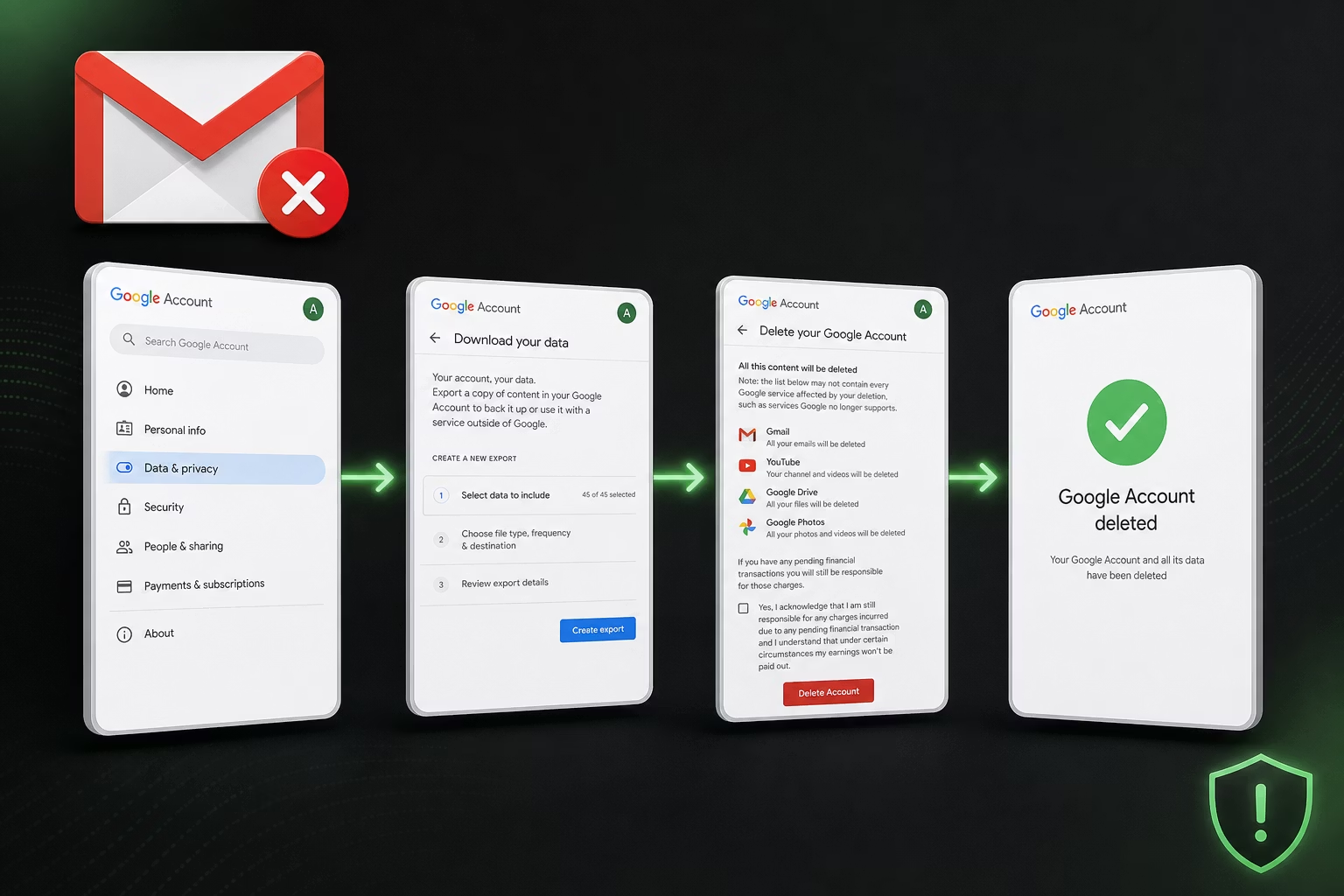
Delete the complete Google account (type 3)
- Go to myaccount.google.com
- Data and privacy
- Scroll to Delete your Google account
- Authenticate
- Google presents a summary of what will be deleted (services, data, consequences)
- Check both confirmation boxes
- Click Delete account
The recovery window
After deletion, Google maintains a recovery window of ~20-30 days (exact duration varies by jurisdiction and account type). During this window, you can fully restore the account via the official procedure at accounts.google.com/signin/recovery.
Past this delay, all data is permanently erased from Google servers, and recovery becomes impossible. The Gmail address itself is never reassigned to another user.
Cleanly manage a sales team’s sending mailboxes
Zeliq orchestrates your prospecting sequences on a sending infrastructure independent of personal mailboxes. Explore multichannel prospecting.
The Google 2-year inactivity policy: implications
The inactivity policy effective December 1, 2023 has real impact in 2026 on secondary and old accounts.
What counts as “activity”
Any of the following actions resets the inactivity counter:
- Sending or reading an email
- Signing in to Google Drive and viewing a file
- Watching a YouTube video while signed in
- Sharing or taking a Google Photos photo
- Downloading an app from Play Store
- Signed-in Google search
- Using Google Pay
- Signing in to a third-party service via “Sign in with Google”
What exempts an account from the policy
- Google Play purchase (paid at least once on Google Play Store, Books, or Movies)
- Active Google One subscription (paid storage 100 GB+)
- Connection to a monetizing Google service (e.g. monetized YouTube channel)
- Account used professionally as support for Google products or services
- Supervised child account under Family Link
How to keep your secondary accounts active
If you have a secondary account you want to preserve without actively using it, two actions are enough once every 18-20 months:
- Sign in via gmail.com or youtube.com
- Open at least one email OR watch at least 30 seconds of video
That is enough to reset the inactivity counter.
Team management under Google Workspace
For professional addresses under Google Workspace (type firstname@company.com), deletion is not done by the end user but by the Workspace administrator.
Admin procedure to delete an employee account
- Sign in to admin.google.com with an admin account
- Go to Users
- Select the account to delete
- Before deletion, transfer ownership of Drive files to another user (otherwise files are deleted along with the account)
- Export the Gmail mailbox to another user or archive (Google Vault)
- Click Delete user
Cost: the Workspace license of the deleted user is released and can be reassigned.
The case of a salesperson leaving the company
A frequent case. The right process:
- Before departure: transfer ownership of important Drive files, contacts, templates
- On departure day: suspend the account (do not delete) to preserve history access
- For 30-90 days: forward incoming emails to a manager to ensure customer continuity
- Beyond 90 days: permanent account deletion and license release
This procedure protects the company against loss of business data and customer continuity.
The impact on a sales prospecting effort
For a sales team using Gmail (personal or Workspace) for outbound prospecting, account management directly impacts deliverability and commercial continuity.
The burned account problem
A salesperson who has sent massive cold email from their personal mailbox may see their sender reputation degrade. Symptoms: high spam rate, blacklisting, user complaints. The temptation is then to delete the account and start fresh.
It is rarely the right answer, for three reasons:
- Reputation rebuilds better through progressive warm-up (low-volume sends then ramp-up) than through replacement
- Ongoing conversation history is lost
- Anti-spam triggers eventually identify new accounts starting with cold email, even clean
Best practice for an SDR team
To preserve deliverability and commercial continuity, the recommended practice in 2026:
- Use dedicated prospecting mailboxes (not the salesperson’s main mailbox)
- Prefer specific prospecting domains (type get.company.com, hello.company.com) rather than the main domain
- Adopt a sending infrastructure managed by a prospecting tool (Zeliq, Lemlist, Instantly) that handles warm-up, sender rotation and recipient verification
- Do not mix cold prospecting and customer communication on the same mailbox
This separation protects the main mailbox reputation and avoids having to delete it.
Worked example: cleaning a 6-SDR team’s email stack
A US B2B mid-market company wants to clean its stack after 2 out of 6 SDRs leave, and 2 new ones arrive. Comparison of two approaches.
Approach A: account deletion and recreation
- Deletion of the 2 departed SDRs’ accounts: 1 day admin × $700/day = $700
- Creation of 2 new accounts: 1 day × $700 = $700
- SPF/DKIM/DMARC setup for new domains/accounts: 0.5 day × $900 = $450
- New mailbox warm-up (4-6 weeks at reduced volume): opportunity cost ~$6,000 unbooked meetings
- Loss of ongoing conversation history: opportunity cost ~$2,500
- Estimated total cost: ~$10,350
Approach B: clean transition + dedicated prospecting tool
- Migration of departed SDRs’ contacts and templates to new ones: 1 day × $700 = $700
- 90-day email forward then Google Vault archive: Vault license 0.5 month × $35 = $18
- Adoption of a dedicated prospecting platform (e.g. Zeliq) with managed sending infrastructure: 6 × $85/month × 12 = $6,120/year
- No warm-up needed (shared infrastructure)
- History preserved
- Year 1 total cost: ~$6,840 of which $6,120 remains a recurring asset (the tool serves the whole team)
Approach B costs slightly less in cash, but mainly avoids approach A’s opportunity losses, and provides a recurring asset (the prospecting platform) that produces ROI over time.
How Zeliq manages sending infrastructure for you
Zeliq offers a managed, shared sending infrastructure that isolates prospecting deliverability from that of the salespeople’s personal or Workspace mailboxes. The salesperson keeps their professional address for customer exchanges and established conversations; cold prospecting goes through dedicated Zeliq mailboxes, with automatic warm-up, sender rotation and systematic recipient verification.
For a Business Developer, it is the elimination of the dilemma “burn my pro mailbox” vs “miss volume”. The team keeps its Gmail / Workspace addresses clean, and large-scale prospecting runs on a dedicated infrastructure built for deliverability.
Prospect without burning your Gmail accounts
Zeliq orchestrates your sequences on a managed sending infrastructure independent of your personal mailboxes. Account created in 2 minutes, no credit card.
Book a demoCan a Gmail account deleted by mistake be recovered?
Yes, within a ~20-30 day window after deletion. Google maintains a recovery period during which you can fully restore the account via the official procedure at accounts.google.com/signin/recovery. You will have to prove your identity (associated phone number, recovery email, security questions). Past this delay, all data is permanently erased from Google servers and recovery becomes impossible. Important: the Gmail address itself is never reassigned to another user, even after permanent deletion, to prevent identity impersonation.
How do I prevent my Gmail account from being deleted for inactivity?
Since December 1, 2023, Google deletes personal accounts inactive for more than 2 years. To avoid this, simply perform a minimal action every 18-20 months on the account: send or read an email, watch a YouTube video while signed in, open a Drive file, or perform a signed-in Google search. Accounts with a Google Play purchase, an active Google One subscription, a monetized YouTube channel, or used professionally as support are exempt. For your important secondary accounts you do not actively use, schedule an annual calendar reminder to sign in and read an email. That is enough to preserve the account indefinitely.
What’s the difference between deleting Gmail and deleting my Google account?
Deleting the Gmail service (type 2) only erases the Gmail address and inbox. Your underlying Google account (which serves YouTube, Drive, Photos, Maps, Play Store) continues to exist with a replacement email address you provide at the moment of deletion. You keep all your files, photos and YouTube history. Deleting the complete Google account (type 3) erases everything: Gmail, Drive, Photos, YouTube, Calendar, Maps Timeline, Play Store. It is irreversible after the ~20-30 day recovery window. The choice depends on your goal: if you just want to get rid of an old Gmail address but keep your Google Photos, choose type 2. If you want to completely leave the Google ecosystem for this account, choose type 3.
Zeliq and mail-stack rationalization
Deleting an inactive Gmail account is good hygiene, but what matters is rationalizing your sales stack. Zeliq combines 450 million B2B contacts, enrichment and multichannel sequences in a single platform. You replace 3-4 mail tools with a single platform.
Conclusion: three actions to cleanly manage your Gmail accounts
Gmail account management requires a structured approach, especially in a sales team. Three concrete actions.
- Audit your secondary Gmail accounts: how many old or never-used addresses do you have? For those you want to preserve, schedule an annual sign-in. For those you want to delete, launch the Takeout export this week and deletion in 1-2 weeks after archive verification.
- If you manage an SDR team, clearly separate prospecting mailboxes from main ones. Adopt a dedicated sending infrastructure (Zeliq, Lemlist, Instantly) to preserve the team’s Workspace account reputation.
- Document the salesperson departure process: Drive file transfer, 90-day forward, Vault archive, account deletion. Without process, every departure creates an operational hole.
To orchestrate your prospecting on a managed sending infrastructure that isolates your Gmail mailboxes, see Zeliq pricing.
And if you want to clean up your mail stack while keeping a high-performing B2B commercial channel, try Zeliq for free and centralize your prospecting in a GDPR-first platform.