
Connect Aircall to Zeliq and keep every call visible.
Call from your leads, automatically log the duration and outcome of every interaction, and sync activity to your CRM. Keep the context and next action in one workflow.






Click-to-call
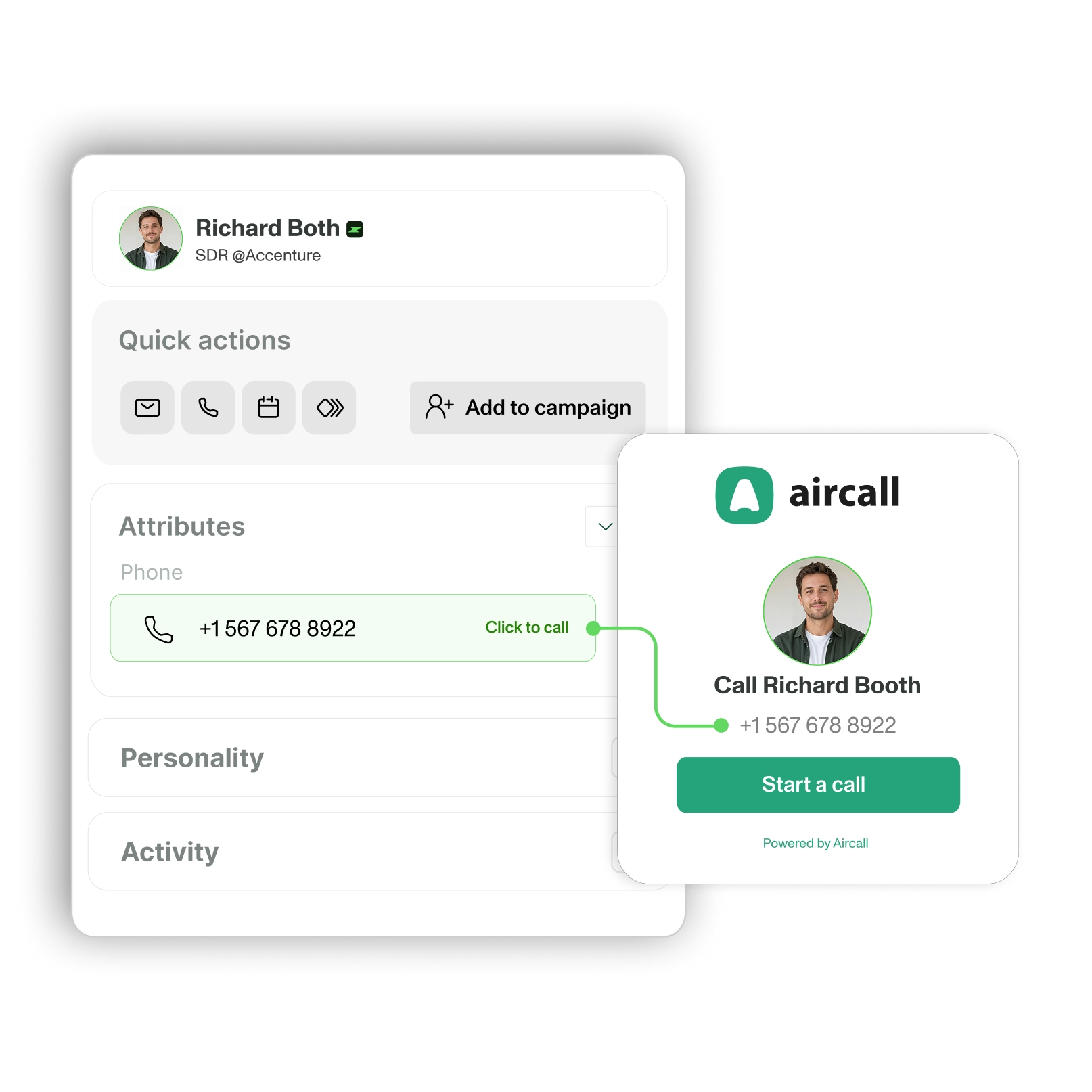
Call prospects in one click from Zeliq.

Click a phone number to launch an Aircall call from your workflow. Avoid manual dialing and keep the lead context visible while you talk.
Call logging
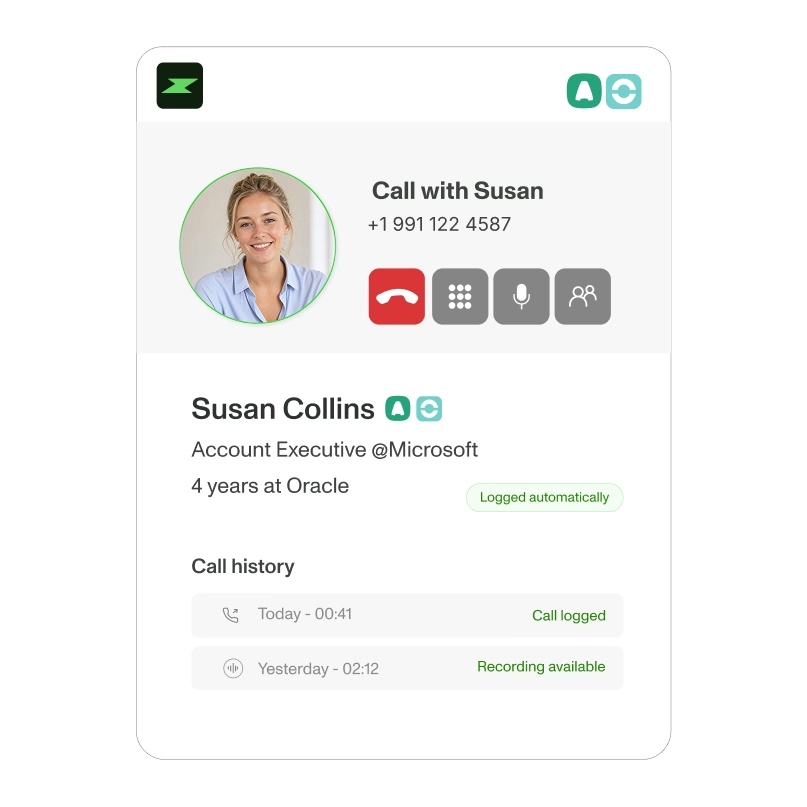
Log every call automatically.

Aircall records the duration, outcome, and recording link in real time. Your team can see who called, when, and what should happen next, without duplicate entry.
Connect Aircall in 3 steps.

Create your Zeliq account.
Sign up free or log in if you already have an account.


Connect your Aircall account to Zeliq.
Go to Settings → Integrations → Aircall and authorize the connection.

Start calling and tracking from Zeliq.
Make a test call to verify logging works. Adjust settings as needed for your workflow.
The proof behind the workflow.
Find, verify, and activate prospects from one platform
with broader coverage and less manual work.
40+
Data providers checked automatically.
Up to 4x
More meetings, based on customer-reported results.
450M
Contacts available to search and enrich.
Customer stories
Loved by revenue teams on G2.

"The best alternative to Kaspr to Lusha for mobile numbers."

Ksenya Borzov
GTM Manager
"Zeliq boosts lead generation with personalized prospecting and saves time by automating all CRM enrichment."

Théo Percheron
Revenue Ops

"There are many phone numbers and integration with Chrome Extension and social messages works well. Easy and intuitive. Very responsive customer support."

Francesca Morichelli
Head of Italy

"The data is higher quality, the processes are simpler... and that is priceless. We've cut our prospecting time in half."

Tony Berthomé
CEO

"I use Zeliq for email sequences; its AI smooths my first demo call, adds leads from the database, and flags errors to avoid unprofessional emails."

Laras Laksi
Client Team Leader

Reliable phone numbers and emails, multichannel sequences without spending hours on it. No more bounces, no more obsolete numbers.

Sébastien Elvira
Sales Specialist
"The best alternative to Kaspr to Lusha for mobile numbers."
Ksenya Borzov
GTM Manager
"Zeliq boosts lead generation with personalized prospecting and saves time by automating all CRM enrichment."
Théo Percheron
Revenue Ops
"There are many phone numbers and integration with Chrome Extension and social messages works well. Easy and intuitive. Very responsive customer support."
Francesca Morichelli
Head of Italy
Connect Aircall and keep every call in the workflow.
Call from Zeliq, track the outcome, and sync activity to your CRM.
FAQ
Can I try Aircall <> Zeliq integration during the Free Trial?
Yes, you can connect Aircall during your free trial, but functionality depends on your Aircall plan.
What you need to connect Aircall:
✓ Zeliq account (free trial works)
✓ Active Aircall account
✓ Admin access on Aircall
What's included in my free trial?
Your 14-day free trial includes every Starter feature, plus 50 credits to test verified email and phone enrichment.
What happens after my trial is over?
When your trial ends, you'll automatically move to the free Basic plan. Your Aircall <> Zeliq integration stays active.
Can I cancel, upgrade or downgrade anytime?
Yes, you have complete flexibility:
To cancel your plan: Log in to your account, go to the “Credits” tab, and click on “Billing Information” at the top right of the window. Your cancellation will take effect at the end of your current billing period. If necessary, contact us at support@zeliq.com and we will process your request.
To upgrade: Go to Settings → Manage Subscription, then select your new plan or credit amount. Changes will take effect immediately. For the Custom plan, contact us at support@zeliq.com and we will process your request.
On a Basic or Starter plan, can I get some help?
We're here to help you succeed with Zeliq. Access support and training at every stage:
→ Weekly product demos: Join live webinars every week to master Zeliq's features.
→ Zeliq Odyssey: Free sales training and best practices to level up your prospecting.
→ Help Center: Step-by-step guides and resources available 24/7.
→ Live support: Chat with our team directly from the platform.
If I'm looking for a custom plan, how does it work?
Need a custom plan? Here's how it works:
- Contact our team: Share your requirements and goals.
- Discovery call: We'll discuss your needs and how Zeliq can help.
- Custom proposal: Get a tailored plan with pricing, features, and integrations.
- Finalize: Review, adjust, and get started.
Does Zeliq work with large enterprises?
Yes. We offer custom enterprise plans with dedicated support, custom integrations, and volume pricing.
To get a custom plan:
- Contact our sales team with your requirements
- Schedule a discovery call to discuss your needs
- Review your custom proposal
- Finalize and launch
Is Zeliq GDPR Compliant?
Yes, Zeliq is fully GDPR compliant. We follow strict data protection standards to keep your information secure. Feel free to check the Legals, Privacy and Terms of use.

