
You want to configure your professional mailbox in Thunderbird, Apple Mail, Outlook desktop or a third-party client, and the term “IMAP server” appears. It’s the technical mechanism that lets a mail client synchronize your emails from a central server (Gmail, Outlook, Yahoo, iCloud) by keeping messages on the server, as opposed to POP3 which downloads and deletes them.
But in 2026, configuring an IMAP server is no longer as simple as before. Microsoft deprecated basic authentication for Exchange Online in October 2022, Google removed support for “less secure apps” since 2022, and OAuth 2.0 has become the mandatory authentication standard at major providers. For accounts with two-factor authentication (2FA), you must now generate an app password or use OAuth, under penalty of inexplicable authentication errors.
This guide explains in 2026 how to configure an IMAP server: exact settings for Gmail, Outlook/Office 365, Yahoo and iCloud, ports 993 and 143, modern authentication (OAuth 2.0, app passwords), IMAP alternatives (Exchange ActiveSync, JMAP), and B2B uses where IMAP remains the reference solution.
What you’ll find:
- What an IMAP server is and difference from POP3
- Exact settings for the 4 main providers
- OAuth 2.0 and app passwords: modern authentication
- Modern alternatives to IMAP in 2026
- Frequent configuration errors and solutions
- B2B worked example: choosing IMAP, POP3 or Exchange
Key takeaways
- IMAP (Internet Message Access Protocol) is the protocol that lets a mail client synchronize your emails with a central server, keeping messages on the server.
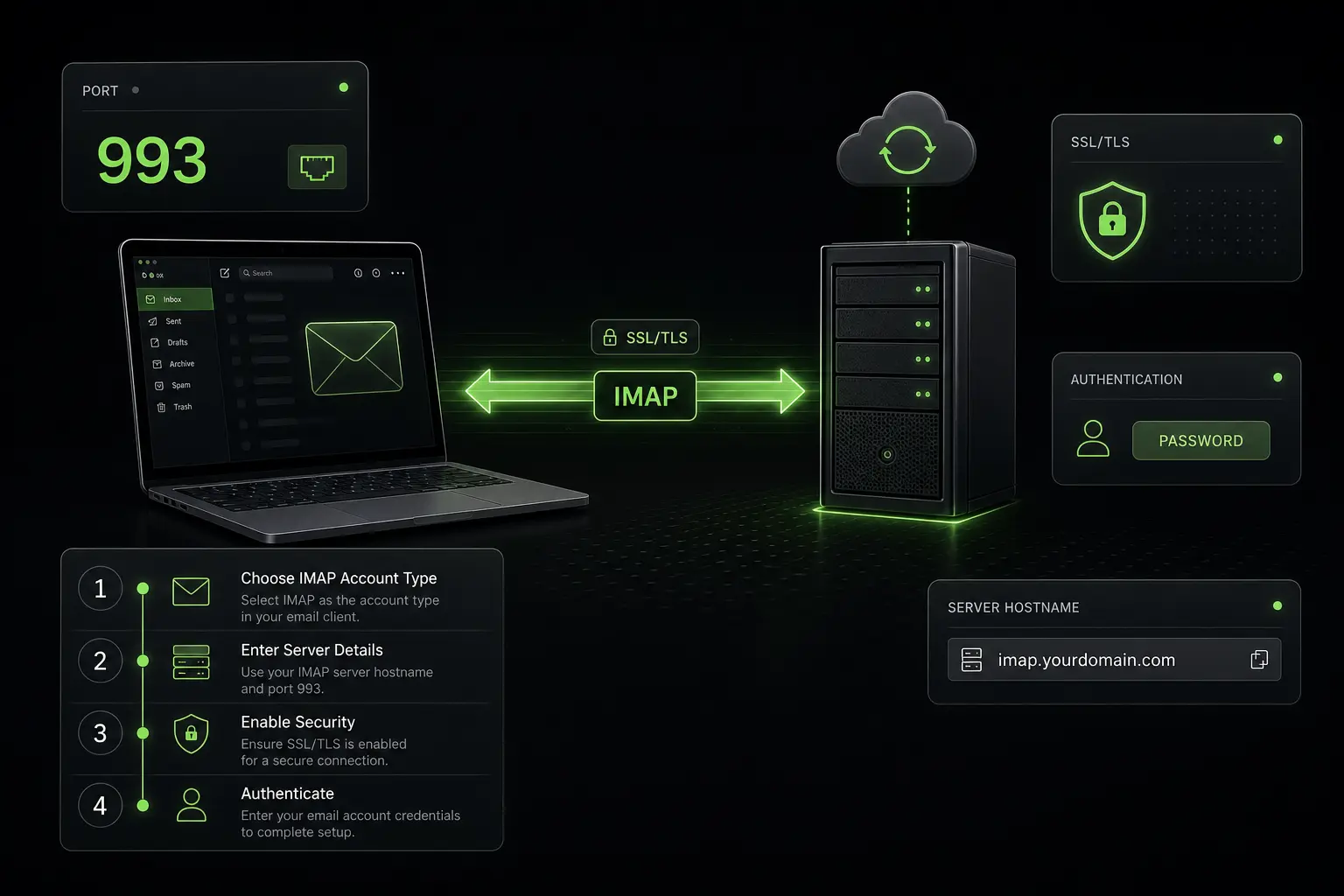
- Standard IMAP ports: 993 for IMAPS (IMAP over SSL/TLS, recommended), 143 for unencrypted IMAP (to avoid, still present for backward compatibility).
- For Gmail, Outlook, Yahoo, iCloud: use port 993 with SSL/TLS, and OAuth 2.0 or app password for authentication (basic auth deprecated since 2022).
- IMAP vs POP3 difference: IMAP synchronizes (emails on all your devices), POP3 downloads and deletes (single device). IMAP is the 2026 standard for 95% of uses.
- Modern alternatives: Exchange ActiveSync (Microsoft, more complete), JMAP (Fastmail, more recent), MAPI/Outlook Microsoft proprietary protocol.
What an IMAP server is and difference from POP3
Technical definition
IMAP (Internet Message Access Protocol) is a standard email reception protocol that lets a mail client (Thunderbird, Apple Mail, Outlook, etc.) synchronize emails with a central mail server.
The principle: emails stay on the server and the mail client downloads copies for display. Any action (reading, deletion, moving to a folder) is reflected on the server and therefore visible on all synchronized devices.
IMAP vs POP3: the comparison
| Criterion | IMAP | POP3 |
|---|---|---|
| Multi-device sync | Yes | No |
| Emails stored on | Server | Downloaded to client |
| Multiple folders | Yes (Inbox, Sent, Drafts, custom) | No (Inbox only by default) |
| Cross-device read/unread marking | Yes | No |
| Server space consumed | High (everything stored) | Low (downloaded and deleted) |
| Offline mode | Local sync possible | Native (local emails) |
| 2026 standard | Yes (95% of uses) | No (deprecated for most needs) |
When to use IMAP vs POP3
IMAP recommended: - You use your mailbox on multiple devices (smartphone + computer + tablet) - You want access to all your folders (Sent, Drafts, organized folders) - Your provider offers sufficient storage quota (≥10 GB)
POP3 still relevant: - You use a single device dedicated to email - You want to archive locally all your emails (limited server space) - Very low server quota (rare in 2026)
In 2026, IMAP covers 95% of B2B and individual uses. POP3 has become marginal.
The role of SMTP server
IMAP handles only reception. Email sending goes through a separate SMTP server (Simple Mail Transfer Protocol). Complete mail client configuration therefore includes: - An incoming IMAP server (to receive) - An outgoing SMTP server (to send)
See our complete guide on Gmail SMTP settings for the SMTP counterpart.
Exact settings for the 4 main providers
Gmail (free and Workspace)
| Parameter | Value |
|---|---|
| IMAP server | imap.gmail.com |
| Port | 993 |
| Encryption | SSL/TLS |
| Username | Your full Gmail address (you@gmail.com) |
| Password | App password (if 2FA) or OAuth 2.0 |
Prerequisites: - IMAP access must be enabled in Gmail settings (Settings → Forwarding and POP/IMAP → Enable IMAP) - If 2FA enabled (recommended): generate an app password at myaccount.google.com → Security → App passwords - Or use a client supporting OAuth 2.0 (Apple Mail, modern Outlook, recent Thunderbird)
Microsoft Outlook / Office 365
| Parameter | Value |
|---|---|
| IMAP server | outlook.office365.com |
| Port | 993 |
| Encryption | SSL/TLS |
| Username | Your full Outlook/Office 365 address |
| Password | OAuth 2.0 (mandatory since October 2022) or app password if MFA |
Important 2026: Microsoft completely deprecated basic authentication for Exchange Online in October 2022. OAuth 2.0 is mandatory. Old clients not supporting OAuth no longer work.
Yahoo Mail
| Parameter | Value |
|---|---|
| IMAP server | imap.mail.yahoo.com |
| Port | 993 |
| Encryption | SSL/TLS |
| Username | Your full Yahoo address |
| Password | App password (mandatory since 2022) |
Yahoo also deprecated basic passwords. App password generation via Yahoo Account Security → Generate app password.
Apple iCloud Mail
| Parameter | Value |
|---|---|
| IMAP server | imap.mail.me.com |
| Port | 993 |
| Encryption | SSL/TLS |
| Username | Your Apple ID (without @icloud.com for iCloud, or complete for @me.com) |
| Password | App-specific password (mandatory if Apple ID 2FA) |
Apple imposes app-specific passwords for all third-party clients since 2019. Generation at appleid.apple.com → Sign-In and Security → App-Specific Passwords.
A B2B sending infrastructure without IMAP server to configure
For large-scale prospecting, a dedicated platform beats manual IMAP/SMTP configuration. Zeliq orchestrates everything. Explore multichannel prospecting.
OAuth 2.0 and app passwords: modern authentication
The problem with basic authentication
Basic authentication (sending username + password in plain text) was the standard for 30 years. In 2026, it has become a major security risk:
- Easy phishing: an attacker who retrieves the password accesses the entire mailbox
- No 2FA possible: impossible to add an extra security layer
- No granular revocation: if compromised, you must change the master password
Microsoft completely removed basic authentication for Exchange Online in October 2022, and Google removed support for “less secure apps” progressively between 2020 and 2022.
OAuth 2.0: the modern standard
OAuth 2.0 lets a mail client access an account without handling the master password. The principle:
- The user signs in on the provider’s portal (Google, Microsoft)
- They authorize the mail client to access their mailbox
- The provider delivers an access token to the client, valid a few hours to a few days
- The client uses this token to authenticate, without ever seeing the master password
- The user can revoke the token from the provider portal at any time
Clients supporting OAuth 2.0: Apple Mail (macOS 11+, iOS 14+), modern Microsoft Outlook, Thunderbird 78+, Postbox, Spark, and most modern clients.
App passwords: the intermediate solution
For old clients that don’t support OAuth 2.0, or for technical tools (scripts, automations), providers offer app passwords: a unique password generated specifically for a given use.
Advantages: - Compatible with any client supporting basic authentication - Individually revocable without touching the master password - Compatible with 2FA
Disadvantages: - Less secure than OAuth 2.0 (still a password to protect) - Requires 2FA enabled with most providers
Modern alternatives to IMAP in 2026
Exchange ActiveSync (EAS)
EAS is the Microsoft proprietary protocol more complete than IMAP: it synchronizes not only emails but also contacts, calendar, tasks and notes.
Advantages vs IMAP: - Calendar + contacts sync beyond emails - Instant push (no polling) - Administrable security policies (remote wipe, password complexity) - Battery savings on mobile
Disadvantages: - Microsoft proprietary protocol, requires license for certain uses - Limited to providers supporting EAS (Microsoft, Google Workspace partial, Apple iCloud partial)
JMAP (JSON Meta Application Protocol)
JMAP is a modern protocol launched by Fastmail and standardized by IETF in 2019 (RFC 8620). It aims to replace IMAP with a more efficient REST/JSON API.
Advantages: - Faster than IMAP (batch operations, native push) - Modern API (JSON, HTTP/2) - Native support for extensions (calendar, contacts)
Disadvantages: - Adoption still limited (Fastmail, a few specific clients) - Not supported by Gmail, Outlook, Yahoo in 2026 - Demanding technical documentation
MAPI / Outlook proprietary
MAPI (Messaging Application Programming Interface) is Microsoft’s historical proprietary API for Outlook desktop. It’s what lets Outlook desktop offer a rich experience (local cache, advanced offline modes, advanced search).
Limits: exclusive to Outlook desktop on Windows, non-standardized, not usable by other clients.
Frequent configuration errors and solutions
Error 1: “Authentication failed” with correct password
Probable cause: 2FA is enabled and the client doesn’t support OAuth 2.0. The master password doesn’t work.
Solution: generate an app password in account security settings (Google, Microsoft, Apple, Yahoo) and use it instead of the master password.
Error 2: “Less secure app blocked”
Cause: Google blocked the application attempting to access with basic authentication.
Solution: use an OAuth 2.0 client or generate an app password. Don’t try to enable “less secure apps”: the option no longer exists at Google since 2022.
Error 3: can’t connect on port 993
Probable cause: local or network firewall blocks port 993 (rare but happens in enterprises).
Solution: check firewall rules, or use a client supporting STARTTLS on port 143 (but prefer 993 if possible).
Error 4: slow or partial sync
Probable cause: server quota exceeded, or local client cache problem.
Solution: free up server space, or reset client local cache (Thunderbird: “Rebuild Index”).
Error 5: Outlook 2010/2013 no longer connects to Office 365
Cause: basic authentication deprecated by Microsoft in October 2022.
Solution: upgrade to Outlook 2019+ or Microsoft 365 Apps, or use a third-party client supporting OAuth 2.0.
B2B worked example: choosing IMAP, POP3 or Exchange
A US B2B mid-market company of 30 people chooses its team email protocol.
Option A: IMAP (Google Workspace + free clients)
- Workspace Business Standard: $14/user/month × 30 = $420/month = $5,040/year
- Clients: Thunderbird (free), Apple Mail (integrated), Outlook (existing)
- Configuration: 30 users × 15 min setup = 7.5 hours × $60/h = $450 one-shot
- Multi-device sync: yes
- Calendar/contacts: via Google Calendar/Contacts independently
- Year 1 total cost: ~$5,500
Option B: Microsoft 365 Business Standard + Exchange ActiveSync
- Microsoft 365 Business Standard: $15/user/month × 30 = $450/month = $5,400/year
- Clients: Outlook desktop (included), Outlook web, mobile
- Configuration: 30 × 5 min (EAS autodiscovery) = 2.5 hours × $60 = $150 one-shot
- Multi-device sync: yes via EAS
- Calendar/contacts: integrated in Outlook
- Remote wipe in case of phone loss: yes
- Year 1 total cost: ~$5,550
Conclusion: at near-equivalent cost, Microsoft 365 + Exchange offers a more complete integrated experience (calendar, contacts, remote wipe). For a B2B SMB in 2026, Microsoft 365 or Google Workspace with their native protocols (EAS or Google Sync) is generally preferable to a generic IMAP/SMTP configuration.
IMAP remains relevant for specific uses: free clients, script integration, local archival, or independently hosted email domains.
How Zeliq avoids IMAP/SMTP complexity for prospecting
For large-scale B2B prospecting, configuring IMAP/SMTP on personal Gmail/Workspace mailboxes is risky (reputation impact, daily limits, authentication complexity). Zeliq offers a dedicated sending infrastructure that:
- Manages its own SMTP servers independent of your professional mailboxes
- Syncs IMAP with your mailboxes to receive replies in your usual interface
- Authenticates via OAuth 2.0 for Gmail, Outlook, Yahoo, iCloud without manual token manipulation
For a Business Developer, it’s the elimination of manual IMAP/SMTP setup and concentration on commercial steering. See also our B2B lead database.
Prospect without managing IMAP/SMTP manually
Zeliq manages its sending infrastructure and syncs your mailboxes via OAuth 2.0 automatically. Account created in 2 minutes, no credit card.
Book a demoWhat’s the difference between IMAP and POP3?
IMAP synchronizes, POP3 downloads. With IMAP, your emails stay on the server and are synchronized with all your devices: if you read an email on smartphone, it appears as read on computer. With POP3, emails are downloaded to a single device and deleted from the server (unless “keep on server” option), preventing multi-device sync. In 2026, IMAP is the standard for 95% of uses B2B and individual. POP3 remains relevant only for specific cases: single device dedicated to email, very limited server quota, or complete local archival. Standard ports: 993 for IMAPS (IMAP over SSL/TLS) and 995 for POP3S (POP3 over SSL/TLS), both recommended. Unencrypted ports 143 (IMAP) and 110 (POP3) are to avoid in 2026.
What’s the standard IMAP port in 2026?
The secure IMAP standard port is 993 (IMAPS, IMAP over SSL/TLS). It’s the port to use in 99% of 2026 configurations. Port 143 still exists for unencrypted IMAP or STARTTLS protocol, but is strongly discouraged because communications go in plain text on the network (interception possible). All major providers (Gmail, Outlook, Yahoo, iCloud) use imap.gmail.com:993, outlook.office365.com:993, imap.mail.yahoo.com:993, imap.mail.me.com:993. For SMTP sending, the secure standard port is 587 (SMTP with STARTTLS) or 465 (SMTPS, SMTP over SSL/TLS). See our complete guide on Gmail SMTP settings.
Why is my IMAP server rejecting my password?
Three main causes in 2026. Cause 1: 2FA enabled and basic auth deprecated. If 2FA (two-factor authentication) is enabled and your client doesn’t support OAuth 2.0, the master password doesn’t work. Solution: generate an app password in account security settings. Cause 2: “Less secure apps” blocked. Google and Microsoft removed support for “less secure apps” between 2020 and 2022. If your client uses basic authentication, it will be blocked. Solution: use a client supporting OAuth 2.0 (Apple Mail, modern Outlook, Thunderbird 78+) or an app password. Cause 3: IMAP disabled. Some providers (Gmail notably) disable IMAP by default. Solution: enable IMAP in account settings (Gmail → Settings → Forwarding and POP/IMAP → Enable IMAP).
Zeliq and integrated mail infrastructure
Configuring IMAP correctly is necessary but insufficient for B2B prospecting at scale. Zeliq handles inbox rotation, warm-up and multichannel sequences across 450 million B2B contacts with a measured 30-day validity of 84%. Your infra stays healthy while volumes scale.
Conclusion: three actions to configure your IMAP server in 2026
IMAP remains the reference protocol for email reception. Three concrete actions.
- Enable OAuth 2.0 if your client supports it: Apple Mail, modern Outlook, Thunderbird 78+. It’s more secure than app passwords and simpler to revoke.
- Generate an app password if your client is old and doesn’t support OAuth: it’s better than disabling 2FA.
- For large-scale B2B prospecting, don’t manually configure IMAP/SMTP on your main mailboxes: use a dedicated platform (Zeliq, Lemlist, Instantly) that manages infrastructure and preserves your Gmail/Workspace mailbox reputation.
For prospecting without IMAP/SMTP complexity, see Zeliq pricing.
And if you want your server configurations to fit into a complete B2B prospecting workflow, try Zeliq for free and connect mail infra + enrichment + sequences in one platform.
Further reading
Table of contents
Placeholder Title
Table of contents
Placeholder Title
Placeholder Title