
You want to send emails from your Gmail account via a third-party client (Thunderbird, Apple Mail, Outlook, Mailtrack, a Python script, or a prospecting tool), and Gmail SMTP server configuration is needed. It’s the technical mechanism that lets any application send emails on behalf of your Gmail account.
But in 2026, configuring Gmail SMTP is no longer a simple matter of port and password. Google removed the “less secure apps” option between 2020 and 2022, daily sending limits are strictly enforced (500/day for free Gmail, 2,000/day in Workspace), and Gmail/Yahoo refuse senders >5,000/day not respecting SPF/DKIM/DMARC since February 2024. For sales teams doing prospecting, these constraints make standard Gmail SMTP configuration unsuitable for large-scale cold email.
This guide explains in 2026 how to configure Gmail SMTP server: exact settings (smtp.gmail.com, ports 587 and 465), OAuth 2.0 or app password authentication, daily limits by account type, SPF/DKIM/DMARC requirements, and professional alternatives (Workspace Relay, third-party services, dedicated prospecting platforms) for intensive B2B uses.
What you’ll find:
- Exact Gmail SMTP server settings
- OAuth 2.0 vs app password: modern authentication
- Gmail daily limits and their implications
- SPF/DKIM/DMARC and Gmail/Yahoo February 2024 requirements
- Alternatives for large-scale B2B cold email
- Worked example: Gmail SMTP vs dedicated alternative
Key takeaways
- Gmail SMTP server:
smtp.gmail.com, port 587 with STARTTLS (recommended) or port 465 with SSL/TLS. - Authentication: OAuth 2.0 (recommended) or app password (application password if 2FA enabled, mandatory since 2022).
- Daily limits: 500 recipients/day in free Gmail, 2,000/day in standard Google Workspace, 10,000/day in Workspace Enterprise with Relay.
- February 2024 requirements: Gmail and Yahoo refuse senders >5,000/day who don’t have SPF, DKIM AND DMARC properly configured.
- For large-scale B2B cold email, standard Gmail SMTP is unsuitable: prefer a dedicated platform (Zeliq, Lemlist, Instantly) with its own sending infrastructure.
Exact Gmail SMTP server settings
Base configuration
| Parameter | Value |
|---|---|
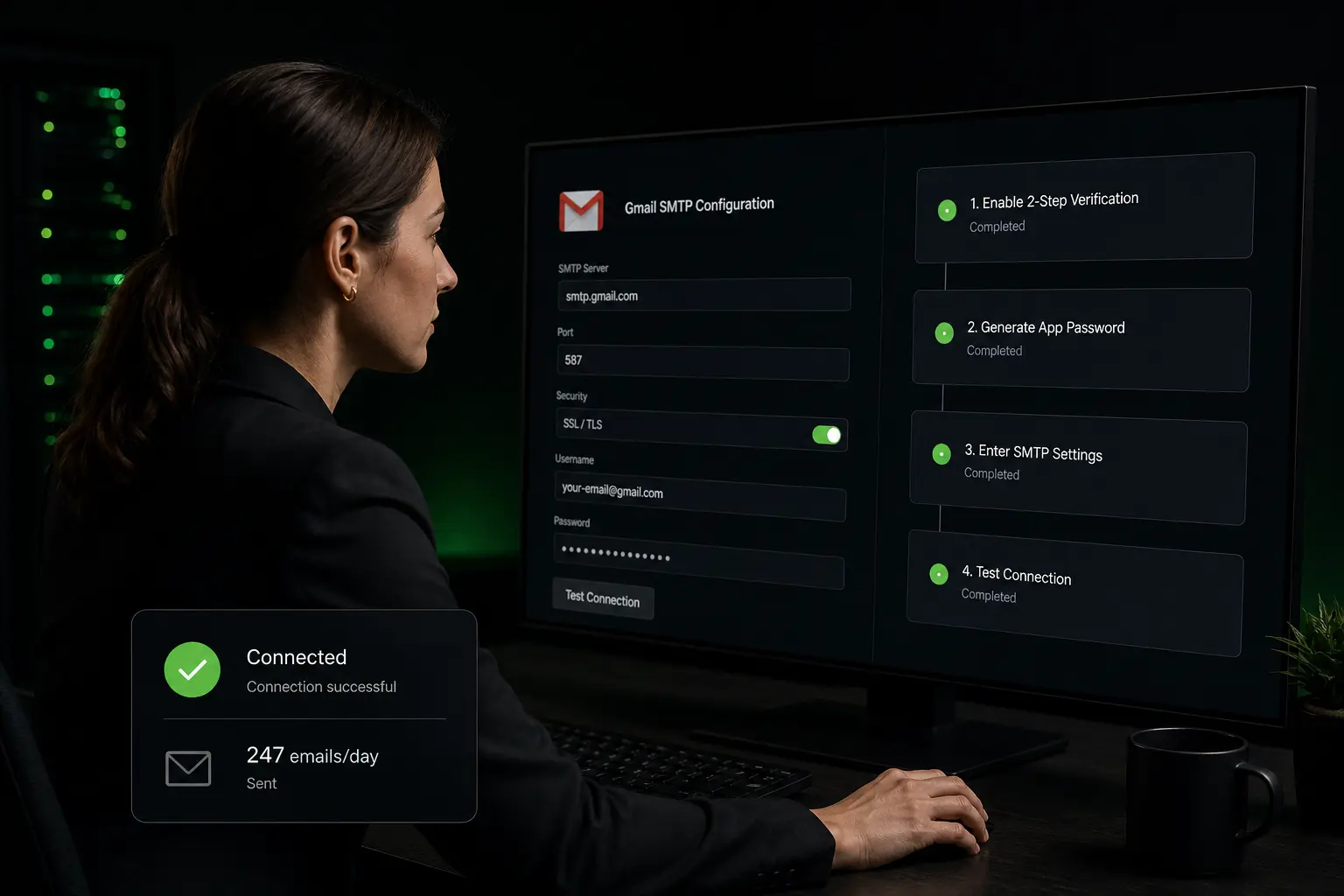
| SMTP server | smtp.gmail.com |
| Port (recommended) | 587 |
| Port 587 encryption | STARTTLS |
| Alternative port | 465 |
| Port 465 encryption | SSL/TLS |
| Authentication | Yes (OAuth 2.0 or app password) |
| Username | Your full Gmail address (you@gmail.com) |
| Password | App password if 2FA, or OAuth 2.0 |
Difference between port 587 and port 465
Port 587 (STARTTLS, recommended): - The connection starts in plain text, then upgrades to TLS via STARTTLS command - It’s the modern standard port for authenticated SMTP sending (RFC 6409) - Recommended by Google, Microsoft, Yahoo
Port 465 (immediate SSL/TLS, legacy): - The connection starts directly encrypted in SSL/TLS - Historically deprecated by IETF in 1998, then re-recommended in 2018 (RFC 8314) - Still widely used for compatibility, especially in old clients
Port 25: no longer to be used for authenticated sending. Reserved for inter-server transit and blocked by most residential ISPs.
Prerequisites before configuration
Before Gmail SMTP works:
- Enable 2FA authentication on the Google account (recommended)
- Generate an app password at myaccount.google.com → Security → 2-Step Verification → App passwords
- Enable SMTP access (usually enabled by default, but to verify)
- Test with a client supporting OAuth 2.0 if possible (more secure)
OAuth 2.0 vs app password: modern authentication
Why not the master password?
Google removed the “less secure apps” option between 2020 and 2022. Consequence: a mail client attempting to connect to Gmail SMTP with the account’s master password is automatically blocked by Google.
Two replacement options exist in 2026: OAuth 2.0 (modern) or app password (intermediate).
OAuth 2.0: the modern standard
OAuth 2.0 lets a mail client authenticate with Gmail without handling the password. The principle:
- The client redirects the user to the Google portal
- The user signs in (with 2FA if enabled) and authorizes the client
- Google delivers an access token valid for a few hours + a refresh token valid longer
- The client uses these tokens to authenticate, without ever seeing the master password
Clients supporting OAuth 2.0: Apple Mail (macOS 11+, iOS 14+), modern Microsoft Outlook, Thunderbird 78+, Spark, Postbox, and most modern clients.
OAuth 2.0 advantages: - More secure (password never transmitted) - Token-by-token revocable from myaccount.google.com → Security → Third-party apps - 2FA-compatible natively
App password: the solution for old clients
For old or technical clients that don’t support OAuth 2.0 (Python scripts, Zapier automations, etc.), Google allows generating an app password: a single-use password for a given client.
Generation procedure: 1. Go to myaccount.google.com → Security 2. Enable 2FA if not already (mandatory for app passwords) 3. Section 2-Step Verification → App passwords 4. Choose the application and generate a 16-character password 5. Use this password instead of the master password in the client
Limits: an app password gives account access with the same rights as the master password. To use only for trusted clients.
Gmail daily limits and their implications
Limits table by account type
| Account type | Sending limit per day | Recipients per email | Notes |
|---|---|---|---|
| Free Gmail (gmail.com) | 500 recipients/day | 500 recipients | Counter resets at midnight Pacific Time |
| Google Workspace Business Starter | 2,000 recipients/day | 2,000 recipients | Standard for SMB |
| Workspace Business Standard/Plus | 2,000 recipients/day | 2,000 recipients | Identical to Business Starter |
| Workspace Enterprise | 2,000 recipients/day + Relay | 2,000 recipients | Relay Service up to 10,000/day |
| Workspace Relay (option) | 10,000 recipients/day | 10,000 recipients | For transactional mailings |
Practical implications
For individual B2B use (one salesperson): - 500/day is largely sufficient (a salesperson sends on average 50-100 emails/day) - No risk of overshoot
For an SDR team of 5-10 people: - Workspace 2,000/day suffices if each account is used for its own prospecting - Risk: an SDR account serving multiple people or a script sending massively can exceed the limit and suspend sending for 24h
For large-scale cold email (1,000+ sends/day per mailbox): - Standard Gmail doesn’t suffice - Workspace Relay can fit but requires configuration and Enterprise budget - Prefer a dedicated platform (Zeliq, Lemlist, Instantly) managing its own SMTP servers
What happens in case of overshoot?
If you exceed Gmail limits:
- First overshoot: sending suspended for 24h
- Repeat: longer suspension (48-72h)
- Repeated abuse: permanent suspension possible, even account deletion
Gmail’s counter resets at midnight Pacific Time (9 AM in France, 3 AM US East Coast), not local time.
A sending infrastructure without Gmail limits
For large-scale prospecting, Zeliq uses its dedicated infrastructure with automatic warm-up. Explore multichannel prospecting.
SPF/DKIM/DMARC and Gmail/Yahoo February 2024 requirements
The February 2024 turning point
Since February 2024, Gmail and Yahoo imposed new strict requirements for senders sending more than 5,000 emails per day to their users:
- SPF (Sender Policy Framework): DNS record listing servers authorized to send for your domain
- DKIM (DomainKeys Identified Mail): cryptographic signature of emails by the sending domain
- DMARC (Domain-based Message Authentication, Reporting and Conformance): policy for handling unauthenticated emails
- One-click unsubscribe mechanism (RFC 8058) for marketing emails
- Spam complaint rate < 0.3% measured by Gmail/Yahoo
Senders not respecting these 5 criteria see their emails rejected or marked spam by Gmail and Yahoo, which represent more than 75% of B2B mailboxes worldwide.
How to verify your configuration
Free testing tools: - MXToolbox (mxtoolbox.com): SPF, DKIM, DMARC analysis of a domain - Mail-Tester (mail-tester.com): send a test email, receive a score out of 10 - GlockApps: advanced deliverability testing (freemium) - Postmark Reverse DNS: checks reverse DNS
Gmail Workspace DKIM configuration
In Workspace: 1. Go to admin.google.com → Apps → Google Workspace → Gmail 2. Section Authenticate email (DKIM) 3. Generate the DKIM key for your domain 4. Add the provided TXT record in your domain’s DNS zone 5. Enable DKIM signing
SPF is configured at the domain level (TXT record v=spf1 include:_spf.google.com ~all).
DMARC is a dedicated TXT record (_dmarc.your-domain.com: v=DMARC1; p=quarantine; rua=mailto:dmarc-reports@your-domain.com).
Alternatives for large-scale B2B cold email
Alternative 1: Google Workspace Relay Service
Workspace Relay is a Google service that lets you send up to 10,000 emails per day via Google SMTP servers. Reserved for Workspace Enterprise.
Advantages: stays in the Google ecosystem, benefits from Google reputation.
Disadvantages: Enterprise pricing (from ~$22/user/month), admin configuration, no automatic warm-up, no integrated sequences or tracking.
Alternative 2: transactional SMTP services
Services like SendGrid, Mailgun, Amazon SES, Postmark, SparkPost offer large-scale transactional sending via SMTP or API.
Advantages: large capacity, accessible price (often ~$1 per 1,000 emails), managed SPF/DKIM/DMARC authentication, deliverability monitoring.
Disadvantages: not designed for B2B cold email (no sequences, no personalization, no reply measurement), reserved for transactional (order confirmations, passwords, etc.).
Alternative 3: dedicated cold email platforms
Platforms like Zeliq, Lemlist, Instantly, Smartlead, Mailshake are specifically designed for B2B cold email:
Advantages: - Dedicated sending infrastructure with automatic warm-up - Sender rotation (multi-mailbox to distribute volume) - Address verification before sending (reduces bounce rate) - Multi-step sequences with automatic follow-ups - Reply rate measurement (2026 truth metric) - GDPR compliance (automatic opt-out mode in footer)
Typical cost: $55-160/user/month depending on platform.
When to choose this alternative: SDR team of 3+ doing 500+ prospecting emails per day, or B2B team serious about deliverability.
Worked example: Gmail SMTP vs dedicated alternative
A US SDR team of 5 prospects 1,500 prospects/day total (300/SDR).
Option A: Gmail SMTP (Google Workspace Business Standard)
- 5 × Workspace Business Standard: 5 × $14/month = $70/month = $840/year
- Limit: 2,000 sends/day/user → fits the 300/SDR
- No automatic warm-up → reputation degradation risk on accounts
- No multi-step sequences → manual or via Zapier
- Tracking: Mailtrack ($90/year) or Yesware ($240/year) → +$450-1,200/year
- Address verification: NeverBounce (~$0.006/email × 1,500/day × 21 days × 12 months) = $2,270/year
- Year 1 total cost: ~$3,500-4,300
- Risks: 1 or more Workspace accounts burned in 6 months → hidden recovery cost
Option B: dedicated cold email platform (Zeliq or equivalent)
- 5 × platform: ~5 × $85/month = $5,100/year
- Limits: dedicated infrastructure, up to 1,000-2,000/day/mailbox
- Automatic warm-up included
- Multi-step sequences included
- Open/click/reply tracking included
- Address verification included
- Year 1 total cost: ~$5,100
- Risks: zero on main account reputation
Differential: ~$800 more for the dedicated platform, but zero reputation risk and massive time savings on orchestration. For 5 SDRs, it’s the trade-off that systematically tips toward the dedicated platform.
How Zeliq manages SMTP for you
Zeliq offers a fully managed sending infrastructure that removes the need to configure Gmail SMTP manually:
- Dedicated Zeliq sending mailboxes with complete SPF/DKIM/DMARC authentication
- OAuth 2.0 synchronization with your Gmail/Workspace mailboxes to receive replies
- Automatic warm-up of new mailboxes (progressive volume ramp)
- Sender rotation to distribute volume across multiple mailboxes
- Address verification before sending
For a Business Developer, it’s the elimination of Gmail limits and concentration on commercial steering. See also our complete guide on IMAP server settings for reception.
Prospect without Gmail SMTP limits
Zeliq manages its dedicated sending infrastructure and syncs your Gmail/Workspace mailboxes via OAuth 2.0. Account created in 2 minutes, no credit card.
Book a demoWhat’s the Gmail sending limit per day?
Free Gmail (gmail.com): 500 recipients per day. Google Workspace (Business Starter, Standard, Plus, Enterprise): 2,000 recipients per day. Workspace Enterprise with Relay Service: up to 10,000 recipients per day via a specific service. These limits count unique recipients, not emails. An email sent to 100 recipients counts as 100 units. The counter resets at midnight Pacific Time (9 AM in France, 3 AM US East Coast), not local time. In case of overshoot, sending is suspended for 24 hours, and repeated abuse can lead to longer suspension or account deletion. For large-scale prospecting (>500-2,000 sends/day per user), standard Gmail is insufficient and you need a dedicated platform (Zeliq, Lemlist, Instantly).
What are the Gmail SMTP ports?
Two secure ports are supported. Port 587 with STARTTLS is the recommended modern port (RFC 6409): the connection starts in plain text and switches to TLS via the STARTTLS command. It’s the standard supported by Google, Microsoft, Yahoo. Port 465 with immediate SSL/TLS is the legacy alternative: the connection starts directly encrypted. Historically deprecated by IETF in 1998 then re-recommended in 2018 (RFC 8314), it’s still widely used for compatibility. Port 25 must no longer be used for authenticated sending in 2026; it’s reserved for inter-server transit and blocked by most residential ISPs. Complete settings: server smtp.gmail.com, port 587 or 465, OAuth 2.0 or app password authentication.
How do I generate a Gmail app password?
5-step procedure: (1) Go to myaccount.google.com → Security. (2) Enable 2-step verification (2FA) if not already, it’s mandatory to generate an app password. (3) Go to 2-Step Verification → App passwords (may require re-authentication). (4) Choose the application and device from dropdown menus (or select “Other” to enter a custom name). (5) Click Generate: Google displays a 16-character password (format xxxx xxxx xxxx xxxx). Copy it and use it in place of your Gmail password in the client. Important: this password is only shown once; note it immediately. It can be revoked at any time from the same page. For modern clients (Apple Mail, Outlook 2019+, Thunderbird 78+), prefer OAuth 2.0 which is more secure than app passwords.
Zeliq and SMTP sending at scale
Sending via Gmail SMTP works for a few dozen emails per day, but at B2B scale you need dedicated infra. Zeliq manages multiple inboxes, warm-up, rotation and multichannel sequences across 450 million B2B contacts. Your deliverability stays controlled while volumes scale.
Conclusion: three actions to configure your Gmail SMTP in 2026
Gmail SMTP remains useful for individual uses, but unsuitable for large-scale cold email. Three concrete actions.
- Verify your SPF/DKIM/DMARC configuration on MXToolbox or Mail-Tester. If you send >5,000 emails/day without the 3 protocols configured, your emails are rejected by Gmail/Yahoo since February 2024.
- Generate an app password if you use a non-OAuth 2.0 client, or switch to a modern client supporting OAuth 2.0 (more secure).
- For large-scale prospecting (>500 emails/day per account), move to a dedicated platform (Zeliq, Lemlist, Instantly) that manages its own SMTP infrastructure with warm-up and complete authentication.
For a sending infrastructure without Gmail limits, see Zeliq pricing.
And if you want your Gmail SMTP sending to integrate into a GDPR-compliant multichannel sequencing engine, try Zeliq for free and combine infra + enrichment + cadence in one platform.