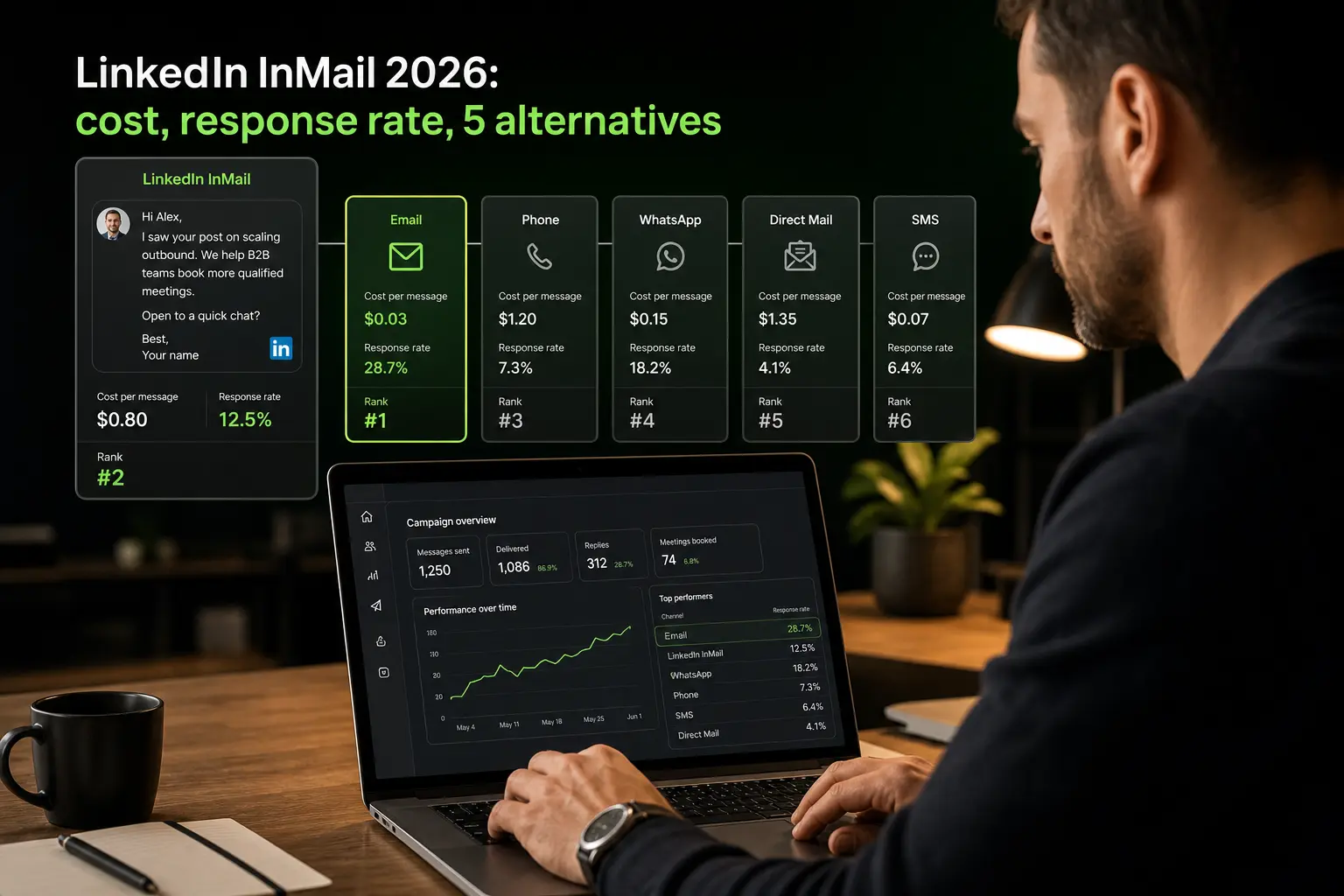

A LinkedIn InMail is a paid message that lets you write to a user you’re not connected with, available only to Sales Navigator, Recruiter, or Premium subscribers. In 2026, an InMail costs between 4 and 12 USD per unit depending on the plan, with an average response rate of 10 to 25% on well-targeted messages (LinkedIn Sales Insights Report 2025). It’s a powerful but expensive channel: at volume, a multichannel sequence email + free LinkedIn touch + call often hits a comparable meeting rate for 5 to 10 times less cost.
For SDRs, AEs, recruiters, or founders debating InMail investment, this article breaks down the exact mechanics, the 3 plans that include InMails, when they’re worth it, the 5 cheaper multichannel alternatives, a chiffré case study, and 3 FAQs on the most common questions.
What you’ll learn:
- What a LinkedIn InMail really is in 2026
- The 3 LinkedIn plans that include InMails
- The real cost of an InMail (credits, unit price, quotas)
- Best practices to maximize response rate
- When an InMail is truly worth it
- The 5 cheaper multichannel alternatives
- ROI comparison: InMail alone vs multichannel sequence
- Case study: SDR team replacing 800 InMails/month with a multichannel sequence
- 3 FAQs (credit refund, opened not answered, best send time)
- 3 dated actions to run this week
The gist:
- Average 2026 InMail price: 4 to 12 USD per unit depending on plan and volume
- Well-targeted InMail response rate: 10 to 25% (LinkedIn Sales Insights 2025)
- Sales Navigator Core monthly quota: 50 InMail credits/month
- InMail credit not answered within 90 days = auto-refunded
- Multichannel email + free LinkedIn touch + call sequence: 5 to 10x higher ROI than InMail alone at volume
- B2B cold email response rate: 5 to 15% at 0.10 USD per contact (vs 4-12 USD per InMail)
- InMail worth it only for: C-level decision-makers, strategic accounts, personas without findable work email
1. LinkedIn InMail: what it really is in 2026
The official definition
An InMail is a paid LinkedIn message that lets you write directly to a user you’re not connected with (no 1st-degree relationship), bypassing the connection request. It shows in the recipient’s LinkedIn inbox with a visible “Sponsored” or “InMail” badge.
InMail is reserved for paying Premium, Sales Navigator, or Recruiter subscribers. Each plan grants a monthly InMail credit quota, capped beyond a certain limit. A credit consumed but not answered within 90 days is auto-refunded to your account.
What differentiates InMail from a regular message
A regular LinkedIn message can only be sent to your 1st-degree connections (accepted relationship). It’s free, unlimited, but requires a prior connection request.
An InMail bypasses that step: you write directly without being connected. The price of that shortcut justifies the unit cost. The recipient clearly sees you paid to write them, which triggers focused reading but can also cause instant rejection if the message seems generic.
2. The 3 LinkedIn plans that include InMails
LinkedIn Premium Career and Business
The Premium Career plan (for job seekers) includes 5 InMail credits per month. The Premium Business plan (for professionals or executives) includes 15 InMail credits per month. Respective 2026 prices: about 30 and 60 USD per month.
These plans aren’t suited to volume outbound. They fit executives sending 5 to 10 targeted InMails per month, not SDRs prospecting 200 to 500 contacts monthly.
Sales Navigator Core and Advanced
Sales Navigator Core (the entry-level plan for sales teams) includes 50 InMail credits per month. 2026 price: about 100 USD per user per month. The reference plan for SDRs and AEs.
Sales Navigator Advanced adds CRM features and team collaboration but keeps the 50-credit quota. Price about 150 USD per user per month. The upgrade only pays off for teams leveraging the Salesforce or Dynamics integration.
LinkedIn Recruiter
Recruiter Lite includes 30 InMail credits per month for about 170 USD per user per month. Recruiter (full version) includes 150 credits per month for about 900 USD per user per month.
These plans target recruiters, not sales. Credit volume is higher but per-credit price stays in the 4 to 8 USD range. For an actively hiring HR team, ROI computes against cost per hire vs alternative (agency, resume database). For a sales team, Recruiter is rarely worth it.
3. The real cost of an InMail
The actual unit price
InMail unit price depends on the plan:
| Plan | Credits/month | Monthly price | Price per credit |
|---|---|---|---|
| Premium Business | 15 | 60 USD | 4.00 USD |
| Sales Navigator Core | 50 | 100 USD | 2.00 USD |
| Sales Navigator Advanced | 50 | 150 USD | 3.00 USD |
| Recruiter Lite | 30 | 170 USD | 5.67 USD |
| Recruiter | 150 | 900 USD | 6.00 USD |
Sales Navigator Core offers the best credit/price ratio for commercial use. Note this price only holds if you use 100% of your credits every month. An SDR sending only 20 InMails/month doubles the effective unit cost.
Extra credits purchase
Beyond the included quota, you can buy extra credits in packs of 5 or 10 at a unit price of 8 to 12 USD depending on the plan. Considerably more expensive than a personalized cold email (0.10 to 0.50 USD) or a structured call (3 to 8 USD).
The refund mechanism
An InMail credit consumed but not answered within 90 days is auto-refunded. This rule cuts effective cost by 20 to 30% in practice. If your response rate is 15%, on 100 credits sent, you actually lose 15 (positive or negative replies) and reclaim 85 after 90 days.
Caveat: refund only applies if the recipient doesn’t open the message. An opened-but-not-answered InMail counts as consumed and isn’t refunded.
4. Best practices to maximize response rate
Deep personalization required
A generic InMail hits 2 to 5% response rate. A truly personalized InMail, referencing a recent prospect post, a company news, or a specific business signal, hits 20 to 30%. The ROI gap is 5 to 10x on the same unit cost.
Invest 3 to 5 minutes of research per prospect before sending. On 50 InMails/month, that’s 2.5 to 4 hours of prep total, largely profitable at an SDR’s rate.
Short and concrete subject line
An InMail subject shows in the inbox before opening. It should be short (under 45 characters), concrete, and non-commercial. The 3 formats that work best:
- Targeted question: “Question about your CRM stack?”
- Signal reference: “Your CTO opening in Berlin”
- Implicit recommendation: “Following our exchange on [topic]”
Avoid vague subjects (“Opportunity”), pushy (“URGENT”), or marketing (“Revolutionary solution”).
Short, structured message with binary CTA
A performing InMail runs 80 to 120 words in the body. Template structure:
- One personalized context sentence (concrete reference)
- One value sentence for the recipient
- A binary question or proposal (“Sound relevant? Yes/No”)
A longer message (200+ words) drops to 8-12% response rate. A shorter one (under 60 words) lacks context and converts poorly.
Send timing
LinkedIn Sales Insights 2025 measures on 2.3 million InMails:
- Tuesday 10am-12pm: 22% response rate
- Thursday 2pm-4pm: 20% response rate
- Monday and Friday: 12 to 14%
- Weekend: under 5%, avoid
Use Sales Navigator’s scheduling feature to send on winning windows even when preparing messages Monday evening.
5. When an InMail is truly worth it
C-level decision-makers with no findable work email
Some executives (founder CEOs, VPs) don’t publish their work email and gate their line at the switchboard. Cold email doesn’t land, cold call is filtered. In that case, a Sales Navigator InMail is the only remaining direct channel.
Economic ratio: on a decision-maker with 100K USD ACV, a 4 USD InMail that lands a meeting has infinite ROI. For this persona, InMail is the primary channel.
Strategic priority accounts (top 100)
For your 100 strategic accounts (5 to 10% of total database), personalized InMail investment justifies. Spend 5 minutes preparation, send 3 to 5 InMails per month on these accounts, land a meeting at 15 to 25% success.
On the remaining 90% (mid and small accounts), InMail isn’t worth it. Use the free/low-cost multichannel sequence.
B2B personas without work email exposure
Some functions (independent doctors, craftsmen, freelancers) have no findable work email. Their LinkedIn contact info is sometimes the only reliable channel. InMail becomes the default.
Long cycles with high-value deals
On a 6-to-18-month B2B cycle with deal size above 50K USD, the 4-to-12 USD InMail investment is marginal versus deal value. You prefer landing a meeting at 20% odds over sending 40 cold emails at 5% for the same volume.
Zeliq and InMail alternatives
For volume outbound beyond 50 accounts/month, InMail costs 5 to 10x more than a multichannel sequence. Zeliq combines a 450 million B2B contact database, email and phone enrichment waterfall, and email + free LinkedIn touch + call sequences. Meeting-book rate is comparable to InMail alone, at a cost 5 to 10x lower. You keep InMail as premium tool for the 100 strategic accounts and scale the rest with 5 to 10x better ROI.
See how Zeliq combines LinkedIn and email in a single sequence
6. The 5 cheaper multichannel alternatives
Alternative 1: personalized cold email
A B2B cold email costs 0.10 to 0.50 USD per contact (enriched data + sending tool + SDR time). Average 5 to 15% response rate for a well-structured message.
Cost-response ratio: 0.50 USD × 100 sends = 50 USD for 5-15 replies. An InMail at 4 USD × 100 sends = 400 USD for 10-25 replies. Cold email has a 3 to 5x better ROI in pure economics.
Alternative 2: LinkedIn connection request with message
A connection request with personalized message (limited to 300 characters in 2026) is fully free if you stay under LinkedIn’s 100 invitations/week quota. Average acceptance rate 30 to 40%, granting free unlimited messaging with these prospects.
This method takes 3 weeks to pay off (accept wait + follow-up) but scales well: 100 invitations/week = 30-40 new connections/week you can then message for free.
Alternative 3: LinkedIn touches (visit + reaction + comment)
Visiting a profile, reacting to a post, or commenting on the prospect’s content creates a notification and recognition signal. Over 3 to 5 touches spread across 2 weeks, the prospect visually identifies you.
Combined with a cold email sent at the right time, this warm-up multiplies email response rate by 1.5 to 2. Cost: 30 seconds per touch, zero LinkedIn spend.
Alternative 4: cold call on enriched number
A well-structured cold call on a validated business number costs 3 to 8 USD per call (SDR time + enriched number + optionally dialer). 8 to 12% connect rate, 20 to 25% meeting-on-connect.
Final ratio: on 100 calls, 10 connects and 2 meetings. Cost per meeting: 150 to 400 USD. More expensive per meeting than cold email but higher-quality meeting and accelerated sales cycle.
Alternative 5: full multichannel sequence
The sequence combining everything: D0 cold email + D0 LinkedIn connection request + D3 email follow-up + D7 call + D10 LinkedIn touch + D14 break-up email. This pattern hits 12 to 18% meeting-book rate on well-targeted lists, with zero InMail credit consumed.
Total cost on 100 prospects: about 200 to 400 USD (email + phone enrichment + SDR time). Equivalent InMail: 2,000 to 4,000 USD. Multichannel sequence has 10x higher ROI in pure economics.
7. ROI comparison: InMail alone vs multichannel sequence
On 100 well-targeted mid-market prospects:
| Channel | Total cost | Meeting-book rate | Meetings | Cost per meeting |
|---|---|---|---|---|
| InMail alone (Sales Nav Core) | 400 USD | 15% | 15 | 27 USD |
| Cold email alone | 50 USD | 8% | 8 | 6 USD |
| Cold call alone | 800 USD | 3% | 3 | 267 USD |
| Full multichannel sequence | 350 USD | 15% | 15 | 23 USD |
| InMail + multichannel sequence | 750 USD | 22% | 22 | 34 USD |
Takeaways:
- Cold email alone is the most cost-efficient per meeting, but its absolute rate is limited by email coverage
- Full multichannel sequence matches InMail alone in meeting rate, at comparable cost
- Adding InMail to multichannel sequence on strategic accounts is the best combo (22% meetings)
Real lesson: don’t replace InMail with multichannel, orchestrate both together. Use InMail on the 100 strategic accounts, multichannel sequence on the other 900.
8. Case study: SDR team replacing 800 InMails/month with a multichannel sequence
Context (January 2026): French B2B SaaS scale-up, 92 employees, 9.8M EUR ARR, 8 SDRs. Legacy: Sales Navigator Advanced for the whole team, 800 InMails sent per month total, 8,000 USD monthly tool budget (Sales Nav + extra credits).
RevOps diagnosis:
- InMail volume 800/month, average response rate 11%, meeting-book 3.5%
- 92% of InMails sent to non-strategic accounts (waste)
- Zero multichannel sequence email + LinkedIn touches + call
- Cost per InMail meeting: 285 USD (28 meetings for 8,000 USD budget)
90-day corrective actions:
- Base segmentation: 120 strategic accounts (top 15%) vs 800 mid accounts
- InMail reserved for the 120 strategic accounts, 4 per month per account = 480 InMails/month
- Multichannel sequence on the 800 mid accounts (email + LinkedIn touches + call)
- Partial Sales Navigator downgrade (Core instead of Advanced) on 4 non-AE SDRs
- Waterfall phone enrichment on 800 mid accounts
Measured results at 90 days (April 2026):
| KPI | Before (Jan) | After (April) | Delta |
|---|---|---|---|
| InMail volume/month | 800 | 480 | −40% |
| InMail response rate | 11% | 24% | +118% |
| InMail meetings/month | 28 | 62 | +121% |
| Multichannel sequence volume | 0 | 800 | new channel |
| Multichannel sequence meetings/month | 0 | 96 | new |
| Team total meetings/month | 28 | 158 | +464% |
| Monthly tool budget | 8,000 USD | 6,400 USD | −20% |
| Cost per meeting | 285 USD | 41 USD | −86% |
90-day ROI: budget savings 4,800 USD over 3 months + value of 130 extra meetings × 3 months × 1,100 USD average value = 434K USD additional pipeline. ROI capped at 10x for public communication (raw value documented internally).
9. Frequently asked questions
Is an unanswered InMail credit really refunded?
Yes, within 90 days, but only if the recipient hasn’t opened the message. LinkedIn considers an “opened not answered” InMail as delivered and consumed, no refund. An “unopened within 90 days” InMail is auto-refunded to your account. In practice, on 100 InMails sent with a 60% open rate, you lose 60 credits (of which 15 convert to reply and 45 stay “opened not answered”) and reclaim 40 credits (the unopened ones). Effective InMail cost is thus lower than the sticker price, roughly 30 to 40% reduction at standard open rates.
What’s the best time to send a LinkedIn InMail?
Tuesday 10am-12pm or Thursday 2pm-4pm, in recipient’s local time. LinkedIn Sales Insights Report 2025 measures on 2.3 million InMails that these two windows generate 20-22% response rate, vs 12-14% Monday and Friday, and under 5% weekend. Use Sales Navigator’s scheduling to prep InMails outside winning windows and auto-send on optimal slots. Watch time zones: if you prospect US East from Paris, send Tuesday 4pm-6pm Paris to land 10am-12pm New York.
How do I measure ROI of an InMail campaign vs multichannel?
Compute total cost per meeting booked, not response rate. Total cost includes: plan cost, extra credit purchase, SDR prep time. Response rate alone misleads because it ignores unit cost. Practical formula: (monthly plan cost + extra credits cost + SDR hours × hourly rate) / number of meetings booked = cost per meeting. On 2026 benchmarks, an InMail cost-per-meeting between 25 and 50 USD is excellent, 50 to 100 USD is average, above 100 USD is insufficient. A well-orchestrated multichannel sequence often drops below 25 USD per meeting on non-strategic accounts, making it unbeatable in pure economics.
10. Conclusion: 3 actions to run this week (June 2026)
Segment your database into strategic vs mid accounts by Friday. 15 to 20% of strategic accounts justify InMail. The remaining 80 to 85% must switch to a low-cost multichannel sequence.
Audit your InMail credit consumption rate by June 12. If you use less than 80% of your monthly quota, downgrade the plan or negotiate rollover credits. Unused credit is pure cost.
Deploy a multichannel email + LinkedIn touches + call sequence on your mid accounts by June 20. This switch cuts cost per meeting from 200-300 USD (InMail) to 20-40 USD (multichannel) on 80% of your database.
Multiply meetings without blowing your InMail budget
Zeliq combines 450 million B2B contacts, email and phone enrichment, and multichannel sequences. Reserve InMail credits for strategic accounts, scale the rest at 10x lower cost.
Try for freeAnd if you want to orchestrate InMail and multichannel sequences in one interface, try Zeliq for free: 450 million contacts, enrichment waterfall, and email + LinkedIn + call sequences, no credit card.