
What Is a LinkedIn URL? How to Find, Customize, and Use It for B2B
Your LinkedIn URL is the unique web address of your profile or company page. By default, LinkedIn assigns you something like linkedin.com/in/jane-smith-3a48b912, which looks unprofessional on a resume, in an email signature, or in a cold outreach signature. Replacing it with linkedin.com/in/janesmith takes under two minutes and pays off every time someone Googles your name, opens your business card, or scans your CV.
This guide covers what a LinkedIn URL is, how to find yours on desktop and mobile, how to customize it, the difference between a personal vanity URL and a company URL, and how SDRs and sales teams use LinkedIn URLs as the entry point of a B2B prospecting workflow. Here is what you will get out of it:
- A clear breakdown of LinkedIn URL anatomy (personal vs company)
- Step-by-step instructions to find and edit your URL on desktop and mobile
- Good and bad URL examples, with the rules LinkedIn enforces
- How to turn a LinkedIn URL into a verified email, a phone number, and a multichannel sequence
What is a LinkedIn URL?
A LinkedIn URL is the public web address that uniquely identifies a profile, a company page, a post, or a newsletter on LinkedIn. It is shareable, copyable, clickable in any browser, and indexed by Google when the profile is set to public.
LinkedIn uses two main URL formats:
- Personal profile URL: identifies an individual member. Format: linkedin.com/in/[handle]. The default handle is your name plus random characters; you can replace it with a custom vanity URL.
- Company page URL: identifies a business. Format: linkedin.com/company/[slug]. The slug is the company name in lowercase, with hyphens instead of spaces.
You will also see URLs for posts (linkedin.com/posts/...), articles, newsletters, schools, and groups, but personal profiles and company pages are what matter most for sales, recruiting, and personal branding.
Why your LinkedIn URL matters
Three concrete reasons to care about it:
- Personal branding. A clean URL on a resume, in a signature, or printed on a card sends the same signal as a clean email address. A messy URL with random digits suggests a profile someone set up in five minutes and forgot.
- Personal SEO. Google indexes public LinkedIn profiles aggressively. When a recruiter or a prospect searches your name, your profile usually lands in the top three results. A vanity URL that contains your real name strengthens that ranking.
- B2B prospecting. For SDRs and account executives, the LinkedIn URL of a prospect is the starting point for the entire enrichment pipeline (email, phone, CRM sync, multichannel sequence). Understanding how the URL is structured makes it easier to scale outbound workflows.
Anatomy of a LinkedIn URL
Both URL types follow a predictable pattern. Once you know the parts, you know what is editable and what is locked.
Personal profile URL
https://www.linkedin.com/in/[handle]/- https://www.linkedin.com is the standard domain. Some country versions exist (fr.linkedin.com, ca.linkedin.com), but the canonical version is the international one.
- /in/ is the prefix for individual profiles. It comes from “individual” and is constant for every member.
- [handle] is the vanity URL. This is the only part you can edit.
Examples:
- linkedin.com/in/janesmith
- linkedin.com/in/jane-smith
- linkedin.com/in/jane-smith-saas
Company page URL
https://www.linkedin.com/company/[slug]/- /company/ is the prefix for business pages.
- [slug] is the company handle, lowercase, hyphens for spaces. Editable by a page admin.
Examples:
- linkedin.com/company/zeliq
- linkedin.com/company/microsoft
- linkedin.com/company/notion-hq
LinkedIn occasionally serves company pages with a numeric ID (/company/12345/) when the slug has not been set. Modern pages always end up with a textual slug once the admin customizes them.
How to find your LinkedIn URL
Before you can share or customize your URL, you have to know where to read it. The path differs slightly on desktop and mobile.
On desktop
- Sign in at linkedin.com.
- Click the Me icon in the top navigation, then click View Profile.
- Look at the address bar of your browser. Your URL is the full string starting with https://www.linkedin.com/in/.
- To see the public version specifically, click Edit public profile & URL in the top-right pane. The page that opens shows your public URL on the right.
On mobile
The mobile app does not show your URL on the profile screen, but it is one tap deeper:
- Open the LinkedIn app and tap your profile picture in the top-left corner.
- Tap View Profile.
- Tap the More button (three dots or the contact info icon).
- Tap Contact info. Your public profile URL is listed there. Long-press to copy it.
If you need to actually edit the URL from a phone, the app does not allow it. You have to switch to a mobile browser (Safari, Chrome, Firefox), open linkedin.com, and follow the desktop steps. Most browsers also offer a Request Desktop Site option, which is useful when the mobile web layout hides the edit button.
How to customize your LinkedIn URL
Customizing a LinkedIn URL takes under two minutes. Here is the exact path on each platform.
Desktop walkthrough
- Sign in at linkedin.com.
- Click Me in the top navigation, then View Profile.
- In the right-side panel, click Edit public profile & URL.
- On the new page, find the Edit your custom URL section in the right panel.
- Click the pencil icon next to your current URL.
- Type the vanity handle you want (letters, digits, and hyphens only).
- Click Save.
The change is live immediately. The old URL does not redirect to the new one, so any existing link that points to your previous handle returns a “profile not found” error.
Mobile browser walkthrough
The native app does not expose URL editing, so the workflow is browser-based:
- Open Safari, Chrome, or Firefox on your phone.
- Go to linkedin.com and sign in.
- Tap the menu icon in the browser and choose Request Desktop Site (the option is named differently on each browser, but every modern browser has it).
- Tap Me, then View Profile.
- Tap Edit public profile & URL, then the pencil next to your URL.
- Type your new handle and tap Save.
That is the only way to set or change a vanity URL from a phone.
LinkedIn rules and limits
LinkedIn enforces strict formatting rules:
- Allowed characters: lowercase letters a-z, digits 0-9, hyphens -.
- Not allowed: spaces, accents, special characters, capital letters, underscores, or the word “linkedin”.
- Length: 3 to 100 characters (most members aim for 5 to 30 to keep it readable).
- Uniqueness: if your preferred vanity is already taken, you have to pick something else.
- Frequency: you can change your URL up to 5 times every 6 months.
The frequency rule matters less than the broken-link problem. Every time you change your URL, every existing link to your previous URL goes dead: business cards in circulation, email signatures, resumes already submitted, posts that mentioned your handle, and external sites that linked to you. Pick a vanity URL once and keep it.
Good and bad LinkedIn URL examples
A vanity URL should be short, readable, and memorable. Here is what works and what does not.
Good URLs
| URL | Why it works |
|---|---|
| linkedin.com/in/janesmith | First name plus last name, compact, no separators |
| linkedin.com/in/jane-smith | Hyphenated full name, easy to read aloud |
| linkedin.com/in/jane-smith-saas | Differentiator (industry) when the bare name is taken |
| linkedin.com/in/jsmith-revops | Initial plus last name plus role family, useful for niche specialists |
Bad URLs
| URL | Why to avoid |
|---|---|
| linkedin.com/in/jane-smith-3a48b912 | LinkedIn default, looks auto-generated |
| linkedin.com/in/jsmith42 | Random number, looks like a gaming handle |
| linkedin.com/in/jane-smith-account-executive-london-uk-2026 | Too long, hard to type, hard to remember |
| linkedin.com/in/jsmithceo-acmecorp | Tied to a specific role and company you may leave |
What structure to pick
Three priorities, in order:
- Your real name first. That is what people search for.
- The shortest available form. janesmith before jane-smith before jane-smith-marketing.
- A stable differentiator if needed. If your name is common, add something that will not change in the next five years: industry (jane-smith-fintech), city (jane-smith-london), or a middle initial (jane-l-smith).
Avoid job titles and company names in the URL. A URL like linkedin.com/in/jane-smith-cto becomes a problem the day you change roles, and you will need to burn one of your five allowed changes to fix it.
LinkedIn company page URL: how it works
The company URL follows the same logic as a personal vanity URL, but it is managed by a page admin rather than an individual member.
How to find a company URL
Three reliable methods:
- Address bar. Go to the page, copy the URL.
- LinkedIn search. Type the company name, click the company in the results, copy the URL.
- Google. Type [company name] linkedin. The first result is almost always the official LinkedIn page.
How to edit the company URL
If you are an admin of the page:
- Go to the company page.
- Click Admin tools in the top right.
- Click Edit page.
- In the Page info section, find the Public URL field and edit it.
- Save.
The slug has to be unique across LinkedIn and follows the same rules as a personal vanity URL (lowercase, hyphens, no special characters).
Important caveat: editing a company slug breaks every external link to the page. Old posts that tagged the company, employee email signatures, landing pages that link to the page, press kits, and partner directories all become outdated overnight. The right time to set the slug is at page creation. After that, only touch it for a major rebrand.
LinkedIn URL and personal SEO
A clean LinkedIn URL is one of the cheapest personal SEO levers available. It costs nothing and pays off on every search of your name.
What Google indexes
Google has indexed public LinkedIn profiles for over a decade. When a prospect or a recruiter searches your name, your LinkedIn profile typically appears in:
- The standard top results (often top three for non-common names)
- The right-side knowledge panel if you have enough signals (employer, photo, role)
- Image results (your profile picture)
How to optimize
Four practical actions:
- Use a vanity URL with your real name. linkedin.com/in/janesmith outranks linkedin.com/in/jane-smith-3a48b912 on the query “Jane Smith”.
- Set your profile to public. Go to Settings & Privacy then Visibility then Edit your public profile. Make sure the key sections (headline, experience, photo) are visible to non-LinkedIn users.
- Write a keyword-rich headline. The headline appears in HTML metadata that Google reads. “Jane Smith, Account Executive at Zeliq” outperforms “Jane Smith”.
- Stay active. Profiles that publish or comment regularly get crawled more often, which keeps your ranking fresh.
Why this matters in B2B
For an account executive or an SDR, a prospect almost always Googles you before a discovery call. If your LinkedIn profile shows up fast and looks credible, you start the meeting on better footing. For a sales leader, the team’s collective LinkedIn presence is a hiring signal and a credibility signal at scale: clean URLs, polished headlines, and active posting suggest a team that takes its craft seriously. The Zeliq sales leader playbook lays out a few of those team-level moves in more detail.
Using a LinkedIn URL for B2B prospecting
This is where a LinkedIn URL becomes operational rather than cosmetic. For an SDR running outbound, every prospect URL is the entry point of the enrichment and engagement pipeline.
From URL to verified contact
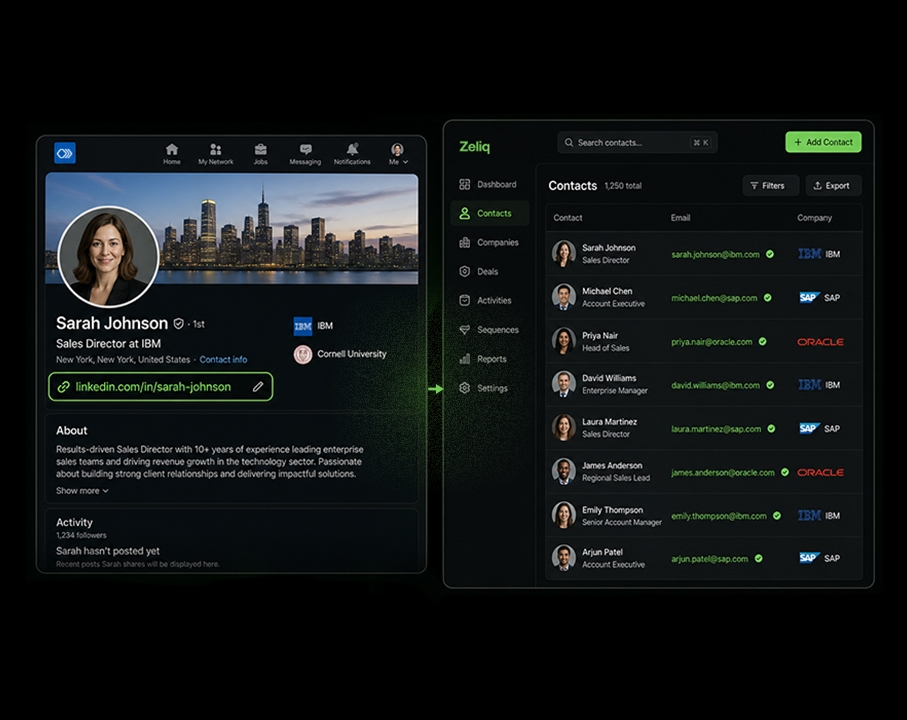
When you identify a prospect on LinkedIn (Sales Navigator search, regular search, or someone who engaged with one of your posts), their URL is the unique identifier that lets you trigger the full prospecting chain:
- Enrichment. Pull a verified work email, a direct phone number, and a mobile from the URL.
- CRM sync. Push the contact into HubSpot, Salesforce, or Pipedrive without copy-pasting fields.
- Sequence launch. Drop the contact into a multichannel cadence with email, LinkedIn touches, and call tasks.
Done manually, those steps take five to ten minutes per prospect. With a Chrome extension built for LinkedIn, they collapse into a single click.
A typical SDR workflow in 2026
The pattern most outbound teams converge on:
- You spot a prospect on LinkedIn or Sales Navigator.
- You click the prospecting extension in your browser.
- The extension reads the LinkedIn URL, runs a waterfall enrichment across 40 plus data providers, pushes the contact into your CRM, and adds them to a predefined multichannel sequence.
- The first email goes out immediately, followed by a connection request, a LinkedIn message, and a call task on the days defined by the sequence.
This is what scales an SDR from 20 contacts a day to 100 plus, without losing personalization quality.
Categories of tools that consume LinkedIn URLs
Three buckets:
- Pure enrichers. Take a URL, return an email and phone. High volume, low context.
- All-in-one platforms. Enrich, sync to CRM, and run multichannel sequences inside one interface. This is the Zeliq pattern.
- LinkedIn automation tools. Send connection requests, messages, and InMails at scale from a list of URLs. Powerful but riskier on LinkedIn compliance if the volume is set wrong.
How Zeliq turns a LinkedIn URL into pipeline
The Zeliq Chrome extension for LinkedIn reads a profile URL or a Sales Navigator URL, runs waterfall enrichment across 40 plus providers, and pushes the contact into a multichannel sequence with CRM sync, all in one click. No copy-paste, no tab switching, no broken handoff between the database and the sequence tool. It is built for business developers and SDR teams that prospect at volume and need their tooling to keep up.
If you want to see what a single LinkedIn URL turns into when the workflow is automated end to end, start free with Zeliq and run it on your next ten prospects.
Common LinkedIn URL mistakes
Five mistakes that come up over and over.
1. Changing your URL too often
LinkedIn caps URL changes at five per six months, but the harder limit is the broken-link problem. Every change kills every link that pointed to the old URL: resumes in circulation, email signatures from past employers, posts that tagged your old handle, partner directories. Choose your vanity URL once and keep it.
2. Embedding a job title or employer
linkedin.com/in/jane-smith-cto-acme looks great today. The day you leave Acme or change roles, you have to burn a URL change to fix it, and every link to the old URL goes dead. Stick to your name, optionally plus a stable industry tag.
3. Forgetting the public profile setting
A clean URL is useless if the profile is set to private. Visitors hit a “this profile is restricted” page, and Google does not index the content. Check Settings & Privacy then Visibility then Edit your public profile and confirm the headline, experience, and photo are visible to non-LinkedIn users before you ship the URL anywhere.
4. Using the LinkedIn URL as a CTA in a cold email
Linking to LinkedIn in the body of a cold email reduces deliverability and pulls the reader off your CTA. The clean pattern: LinkedIn URL in the email signature only, with the in-body CTA being a reply request, a meeting link, or a calendar booking page.
5. Ignoring the company URL at launch
When a marketer creates a LinkedIn company page, the default slug is often ugly (/company/your-company-sas-12345). Customize it on day one, before any external link, ad, or signature points to the wrong slug. Once external traffic exists, every change creates a 404 problem.
TL;DR
- A LinkedIn URL is the unique web address of your profile (linkedin.com/in/[handle]) or a company page (linkedin.com/company/[slug]).
- The default handle is messy. Customize it to a vanity URL based on your real name in under two minutes from desktop, or from a mobile browser in desktop mode.
- LinkedIn allows letters, digits, and hyphens, 3 to 100 characters, with up to 5 changes per 6 months. Pick once and keep it.
- For company pages, set the slug at launch and avoid touching it later (broken links).
- For B2B prospecting, the URL is the entry point of the entire enrichment plus sequence pipeline. The right tooling turns a LinkedIn URL into a verified email, a phone number, and a multichannel cadence in a single click.
If your team is still copy-pasting LinkedIn URLs into a spreadsheet, then into an enricher, then into a CRM, then into a sequence tool, you are leaving hours per SDR per week on the table. The Zeliq Chrome extension collapses all four steps into one click, directly from the LinkedIn profile you are already looking at.