
Lead Profile Template: Required Fields, CRM Mapping and Best Practices
Every SDR has opened a lead record, found three half filled fields and a comment written six months ago by someone who left the company, and closed the tab. That is what an unstructured lead profile looks like in production. It costs meetings, blows up handoffs between SDR and AE, and quietly poisons the scoring model that sales ops spent two quarters building.
This guide is a working lead profile template for B2B sales teams in 2026. It covers the fields that actually matter, how they map into HubSpot, Salesforce and Pipedrive, how to score and enrich them, and the operational rules that keep the data alive. Persona is SDR, sales ops and RevOps. No marketing fluff, no field for “personality color”.
What a lead profile actually is
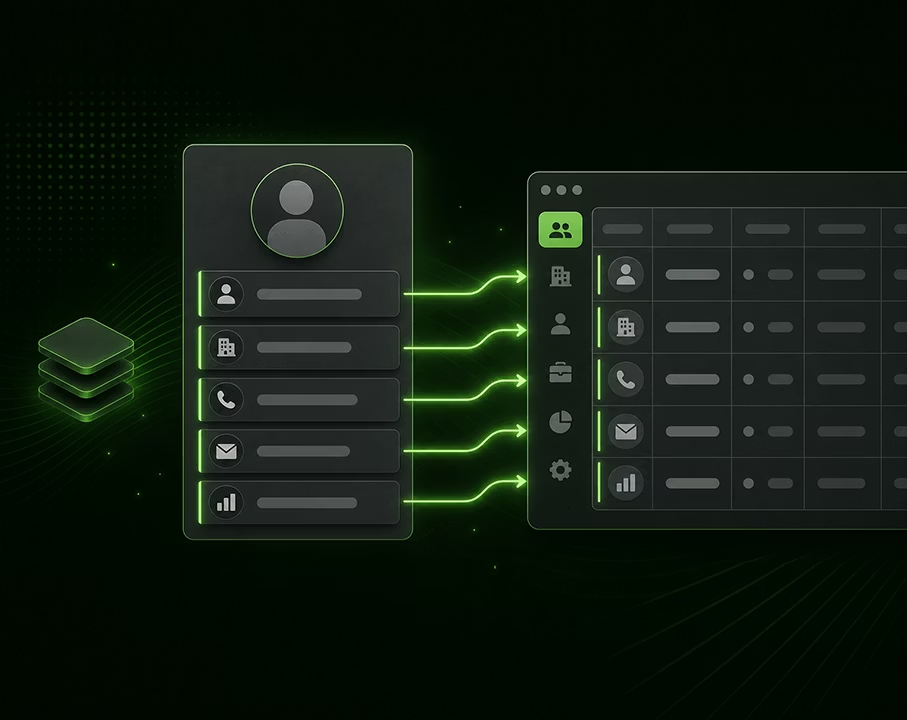
A lead profile is the structured record a sales team keeps on a single contact, gathering identity, company context, qualification status, engagement history and the next step. Sometimes it is called a prospect profile or, in CRM language, a “lead record”. The naming changes, the function does not: it is the unit of memory of your pipeline.
It is not the same thing as an Ideal Customer Profile, and it is not a buyer persona. These three objects get confused all the time, and confusing them is how you end up with junk in your CRM.
Lead profile vs Ideal Customer Profile (ICP)
The Ideal Customer Profile is a description of the type of company you sell to: industry, employee count, revenue band, tech stack, geography, growth signals. There is one ICP (or a small handful for multi product companies). It is a strategic artifact, owned by marketing and sales leadership, used to filter the total addressable market down to a sourcing list.
The lead profile is the record of one specific contact at one specific company. There are thousands of them. They are tactical, owned by the SDR or AE, used to qualify and engage.
Said differently: the ICP tells you who to go after, the lead profile tells you what you know about this one person you are talking to.
Lead profile vs buyer persona
The buyer persona is a fictional archetype: “Sarah, VP of Sales at a 200 person SaaS company, struggles with pipeline coverage, reads SaaStr, evaluates tools through peer recommendations”. It is a messaging tool used by marketing and sales enablement to write copy and structure discovery questions.
The lead profile is the real human you found through your sourcing engine, with their actual title, actual email and actual reply history. The buyer persona informs how you talk to them. The lead profile records what they actually told you.
Three layers, three jobs:
| Object | Scope | Owner | Purpose |
|---|---|---|---|
| ICP | Company segment | Sales leadership | Define the market |
| Buyer persona | Role archetype | Marketing | Shape the message |
| Lead profile | One contact | SDR / AE | Run the conversation |
You need all three. Treating the lead profile as a watered down ICP, or as a populated buyer persona, is the most common mistake on this topic.
Why a structured profile beats a notes field
Every team starts with the same shortcut: a giant text field called “notes” where SDRs dump whatever they remember. It feels flexible. It is also the single biggest source of pipeline waste in B2B sales. Here is what happens when you replace it with structured fields.
Productivity. A rep working from a structured profile spends less time hunting for context before a call. Instead of reading three months of notes and reconstructing what was said, they look at last touch, current stage, next step and qualification status. This is small per call, big per quarter.
Handoff quality. When an SDR books a meeting and hands off to an AE, the AE inherits a record. If the record is structured, the AE walks into the call knowing the budget signal, the pain mentioned, the decision process timeline and who else is involved. If it is unstructured, the AE asks the same questions the SDR already asked, and the prospect notices.
Scoring. A lead score only works on data the model can read. “Reply was warm” in a notes field is invisible to the scoring engine. “Reply sentiment: positive” in a dedicated field is fuel for the model.
CRM hygiene. Structured fields force normalization. Without them, you get “SaaS / saas / Software as a Service / SAAS” as four different industry values, and no segment analysis is possible.
Forecasting. Sales leadership cannot forecast on prose. They forecast on stage, probability, expected close date and deal size. Those have to live in fields, not in notes.
The notes field still exists in a good template, but it is the last field, used for the human texture (objection wording, champion personality, internal politics) that does not fit a dropdown. It is not where the structure lives.
Required fields for a 2026 lead profile
Aim for 20 to 30 fields populated reliably, not 80 fields half empty. Here is the working set, grouped by category.
Firmographics (the company)
- Company name
- Domain (canonical website)
- Industry (closed list aligned with your ICP)
- Employee count (banded: 1-10, 11-50, 51-200, 201-1000, 1001-5000, 5000+)
- Annual revenue band
- HQ country and HQ city
- Funding stage (bootstrapped, Seed, Series A through D+, public, private equity)
- Last funding event (date and amount, if any)
- Tech stack signals (CRM in use, marketing automation, sales engagement, data vendor)
Persona role and seniority
- First name and last name
- Job title (verbatim from LinkedIn or the email signature)
- Normalized role (closed list: Founder, Sales, Marketing, RevOps, Engineering, Finance, Operations, etc.)
- Seniority level (IC, Manager, Director, VP, C-level)
- Department
- Reports to (if known)
- Buying role (Champion, Economic Buyer, User, Influencer, Gatekeeper)
Contact details with verified status
- Work email (with verification status: Verified, Catch-all, Risky, Unverified)
- Direct phone (with verification status)
- Mobile phone
- LinkedIn URL
- Verified date for each contact channel
The verification status field is non negotiable. Sending a sequence to an unverified email is how you torch your domain reputation. Hiding the verification status inside a tag or a notes line, instead of a dedicated field, makes it impossible to filter at the sequence enrollment step.
Intent signals
- Hiring signal (open roles in relevant functions, last 30 days)
- Tech adoption signal (just installed a competing tool, just removed a tool)
- Funding signal (raised in the last 90 days)
- Leadership change (new CMO, new Head of Sales, new CRO)
- Content signal (visited pricing page, downloaded a specific asset, attended a webinar)
- Third party intent (Bombora, G2 buyer intent, etc.)
These fields are the difference between cold outbound and warm outbound. They also feed scoring directly.
Source and ownership
- Source channel (cold outbound, inbound form, event, referral, partner, paid search)
- Source detail (which sequence, which form, which event)
- Created date
- Owner (the SDR or AE responsible right now)
- Original owner (for round robin reassignments)
Qualification status
Pick one qualification framework and stick to it across the team. Mixing BANT, MEDDIC and CHAMP across reps is a guaranteed mess.
For SDR led top of funnel, BANT is usually enough:
- Budget: identified, in range, out of range, unknown
- Authority: decision maker, influencer, gatekeeper, end user
- Need: explicit pain, implicit pain, no pain identified, exploring
- Timing: this quarter, next quarter, this year, no timeline
For AE led mid funnel, MEDDIC or MEDDPICC carries more weight:
- Metrics (the quantified business outcome)
- Economic buyer (named)
- Decision criteria
- Decision process
- Identify pain
- Champion (named)
- (Competition, Paper process for MEDDPICC)
CHAMP is a lighter alternative for transactional cycles:
- Challenges
- Authority
- Money
- Prioritization
Whatever you pick, each component is a separate field, not a single qualification text blob.
Sequence engagement
- Current sequence enrolled
- Sequence step number
- Last touch date and channel (email, LinkedIn, call, in person)
- Last reply date and sentiment (positive, neutral, negative, out of office, unsubscribe)
- Open count
- Click count
- Reply count
- Meetings booked
Pipeline state
- Stage (Lead, MQL, SQL, Opportunity, Proposal, Negotiation, Closed Won, Closed Lost)
- Sub stage if relevant (in Opportunity: discovery done, demo done, business case shared, etc.)
- Probability (linked to stage, but adjustable)
- Expected close date
- Estimated deal size
- Disqualification reason (mandatory when moving a lead to Closed Lost or Disqualified)
Next step
- Next action (verb + object, never a vague label)
- Next action due date
- Next action owner
If a lead profile has no next step, the lead is either closed or dead. There is no middle state.
Free text notes
One field, at the bottom, for the qualitative texture. Keep it short. If a fact deserves its own field, give it one.
Template structure you can copy
Below is a copy ready table format. Use it as the schema for a CRM custom object, a Notion database or a spreadsheet. The columns are the fields, one row per lead.
| Field | Type | Example |
|---|---|---|
| First name | Text | Sarah |
| Last name | Text | Chen |
| Job title | Text | VP of Sales |
| Normalized role | Picklist | Sales |
| Seniority | Picklist | VP |
| Buying role | Picklist | Economic Buyer |
| Work email | sarah.chen@acme.com | |
| Email status | Picklist | Verified |
| Direct phone | Phone | +1 415 555 0140 |
| Phone status | Picklist | Verified |
| LinkedIn URL | URL | linkedin.com/in/sarahchen |
| Company name | Text | Acme |
| Domain | URL | acme.com |
| Industry | Picklist | B2B SaaS |
| Employee band | Picklist | 51-200 |
| Revenue band | Picklist | 10-50M USD |
| HQ country | Picklist | United States |
| Funding stage | Picklist | Series B |
| Last funding event | Date + amount | 2026-02-12, 25M USD |
| Tech stack | Multi picklist | Salesforce, Outreach |
| Source channel | Picklist | Cold outbound |
| Source detail | Text | Sequence 24 Q2 SaaS VP Sales |
| Created date | Date | 2026-04-08 |
| Owner | User | Marc Roy |
| BANT Budget | Picklist | In range |
| BANT Authority | Picklist | Decision maker |
| BANT Need | Picklist | Explicit pain |
| BANT Timing | Picklist | This quarter |
| Hiring signal | Boolean + detail | True, 4 SDR roles open |
| Funding signal | Boolean | True |
| Tech signal | Text | Just removed Apollo |
| Last touch | Date + channel | 2026-05-02, Email |
| Last reply | Date + sentiment | 2026-05-03, Positive |
| Sequence enrolled | Picklist | Q2 SaaS VP Sales v3 |
| Sequence step | Number | 4 |
| Stage | Picklist | SQL |
| Probability | Number | 30 |
| Expected close date | Date | 2026-07-15 |
| Deal size | Currency | 48000 USD |
| Next action | Text | Send POC scope to Sarah |
| Next action due | Date | 2026-05-08 |
| Disqualification reason | Picklist (conditional) | Empty |
| Notes | Long text | Champion: Marie (CMO) |
That is roughly 40 fields. Some teams will trim further, that is fine. Trim by removing fields, not by leaving fields blank.
CRM mapping: HubSpot, Salesforce, Pipedrive
The template above is platform agnostic. Here is how it lands in the three CRMs the SDR / RevOps audience runs.
HubSpot
HubSpot uses two main objects: Contact for the person, Company for the firm, plus Deal for the opportunity.
- Identity, persona role, seniority, contact details, source, owner, sequence engagement, qualification fields and next step go on Contact.
- Firmographics, intent signals tied to the company (funding, hiring, leadership change), domain and HQ go on Company.
- Stage, probability, expected close date, deal size go on Deal, with the contact as a primary contact role.
In HubSpot, qualification fields like BANT components are added as custom Contact properties, grouped in a “Qualification” group. Sequence engagement counters (opens, clicks, replies) are native if you use HubSpot Sequences. Last touch and last reply are also native.
Salesforce
Salesforce splits the journey across Lead (pre conversion) and Contact + Account + Opportunity (post conversion).
- Pre conversion, fields live on Lead: identity, source, basic firmographics, qualification status, stage = Lead/MQL/SQL.
- At conversion, the Lead becomes a Contact (person), Account (company) and optionally an Opportunity (deal). Fields are split across the three objects accordingly.
- Custom qualification objects (a child object on Opportunity for MEDDIC components) are common in mid market and enterprise orgs.
The conversion step is the one that breaks most often. If your lead profile has fields that do not map cleanly to Lead and to Contact post conversion, those fields disappear at conversion. Audit your conversion mapping every quarter.
Pipedrive
Pipedrive uses Person, Organization and Deal. It does not have a separate Lead object by default (Leads is a separate inbox, not a record).
- Person carries identity, role, contact details, source, owner, qualification.
- Organization carries firmographics and company level intent.
- Deal carries stage, value, probability and expected close date.
Pipedrive is lighter than the other two and works well for transactional cycles. For complex enterprise selling with MEDDIC, you will hit limits.
Whatever the platform, the golden rule: one source of truth per field. If the lead’s industry lives both on Lead and on Account in Salesforce, you will have inconsistent reports within a quarter.
Want the lead profile to fill itself? Connect a B2B database with waterfall enrichment to pre populate firmographics, persona role and verified contacts at creation time, instead of asking SDRs to type it. See Zeliq’s lead database and waterfall enrichment.
How to enrich a lead profile
Manual entry of firmographics by SDRs is a productivity disaster. A rep typing in industry, headcount and funding status for 50 leads is a rep not booking meetings. Enrichment exists precisely to remove this load.
Waterfall enrichment
Waterfall enrichment queries multiple data providers in sequence (or in parallel) to find the best available data point for each field. Provider A returns an email but no phone, provider B returns the phone, provider C confirms the title. The waterfall picks the freshest, most reliable value per field.
In practice, a serious enrichment setup queries 30 to 40+ providers. No single vendor covers every geography, every industry and every seniority equally well. The waterfall is what brings coverage from “60% of leads enriched” to “85%+”.
Intent signal enrichment
Beyond static firmographics, intent enrichment surfaces buying signals: hiring activity, funding events, tech adoption, leadership changes, content engagement. These signals are time sensitive. A funding round from 2024 is firmographic. A funding round from last week is intent.
Intent signals belong in dedicated fields, not in the notes. They feed scoring (next section) and they trigger sequence enrollment automation: “if funding signal = true and ICP fit = true, enroll in sequence Funded SaaS Q2”.
Re-enrichment cadence
Enrich at three moments:
- At creation: when the lead enters the CRM, run firmographics + persona + contact details.
- At reactivation: before re-engaging a lead that has been dormant for 60+ days, re-enrich.
- On a fixed cadence: every 90 days for active leads, every 180 days for dormant ones.
This cadence is what fights data decay (see below).
Using the profile for scoring
Lead scoring assigns a numeric score to each lead based on fit (does this lead match the ICP?) and intent (is this lead showing buying signals?). The score routes the lead: hot leads to the AE today, warm leads to the SDR sequence, cold leads to the nurture stream.
A scoring model only sees the fields you give it. Hence the obsession with structured profile fields. The scoring fields typically include:
- Fit fields: industry match, headcount match, geography match, tech stack match, seniority match.
- Engagement fields: opens, clicks, replies, sequence step reached, meetings booked.
- Intent fields: hiring signal, funding signal, content signal, third party intent.
Each field gets a weight. The model outputs a score from 0 to 100. Above the threshold, the lead is hot. Below, it goes back to nurture.
The scoring model is only as good as the inputs. A funding signal stuck in the notes field cannot be weighted. The same signal in a structured field can.
Qualifying conversation: SDR vs AE questions
The lead profile structures the data, but the data still has to come from somewhere. Most of it comes from enrichment. The qualification fields, especially BANT and MEDDIC components, come from conversation.
SDR level questions, on a discovery call, focus on pain, fit and timing. They feed BANT Need, BANT Timing, fit fields and the initial pain note.
- “What triggered you to take this call?”
- “How are you handling [problem the prospect is meant to have] today?”
- “What does it cost you when [pain event] happens?”
- “Who else on your team is feeling this?”
- “Is this something you are looking to fix this quarter, or is it on the roadmap for later?”
AE level questions, on a deeper discovery or demo call, dig into economics, decision process and competition. They feed MEDDIC Metrics, Economic Buyer, Decision Criteria, Decision Process, Champion and Competition.
- “If we fix this, what is the business outcome you would measure success against?”
- “Who signs off on a budget at this size?”
- “Walk me through how you typically buy a tool like this.”
- “What other options are you evaluating?”
- “Who else on your side needs to see this before a decision?”
- “What is the timeline once you decide?”
Each answer maps to a field. After the call, the AE updates the profile in five minutes flat. If the call notes go into a freeform paragraph, the structured fields stay empty and the next handoff is broken.
Data quality and decay
B2B contact data degrades fast. Industry consensus puts the decay rate at 2 to 3% per month, sometimes higher in fast moving segments. People change jobs, companies rebrand, phone numbers get reassigned, emails bounce. After 12 months untouched, a lead profile is between 25% and 35% wrong. After 24 months, it is essentially fiction.
Three operational rules fight decay:
- Bounce hygiene: every email bounce flips email status to Risky and triggers a re-enrichment within 7 days. A lead with three bounces in a row gets archived.
- Periodic re-enrichment: 90 day cadence on active leads, 180 day on dormant.
- Job change detection: when an enrichment provider flags that a contact has moved companies, the old profile is archived and a new lead is created at the new company. The old champion at the old company becomes a sourcing signal for the new company (warm intro waiting to happen).
Without these rules, you are running sequences on a database that is partly hallucinated. The sender reputation cost is brutal.
AI for enrichment and profile maintenance
A few practical AI use cases that actually move the needle on lead profile quality, beyond the marketing noise.
Title normalization. Free text job titles are messy: “VP Sales”, “VP, Sales”, “Vice President of Sales”, “VP of Revenue”, “Head of Sales (also Marketing)”. An LLM can normalize these into your closed picklist (Sales / VP) at scale. This is a one shot pre processing step, not a real time call.
Reply classification. When a sequence reply arrives, an LLM classifies sentiment (positive, neutral, negative, out of office, unsubscribe), extracts asks (“send pricing”, “schedule next month”) and updates last reply fields automatically. Manual classification is the bottleneck most SDR managers underestimate.
Conversation extraction. From a Gong / Chorus call transcript, extract MEDDIC components into the structured fields: who was named as economic buyer, what metrics were quoted, what timeline was given. The AE reviews and confirms instead of typing.
Stale record flagging. A model that compares current firmographics against the profile flags drift: “this lead’s company headcount went from 80 to 240, the segment may have changed”. Output is a re-segmentation queue, not an automatic write.
What AI does not solve: judgement on champion strength, deal politics, or whether a “yes interesting” reply is genuine or polite. Those stay human, and they stay in dedicated fields, not in the notes.
Common mistakes
Too many fields. A profile with 80 fields gets filled to 30%. A profile with 30 fields gets filled to 90%. Always trim before you add.
No validation. Free text industry, free text country, free text seniority. Two months later, the segmentation report is unusable. Closed picklists or nothing.
Manual entry only. Asking SDRs to type firmographics by hand for every lead burns one to two productive hours per rep per day. Enrich automatically at creation, ask the human only for what only humans know.
No verification status on contact channels. Sending sequences to unverified emails wrecks deliverability. The verification status must be a field, filterable at sequence enrollment, not a tag buried in a tag list.
Mixing qualification frameworks. Half the team using BANT, the other half using MEDDIC, the rest using their own thing. Pick one. Document it. Train on it.
Lead profile and opportunity merged. Putting deal size and stage on the contact record, instead of on a deal record linked to the contact, breaks reporting. A contact can have multiple deals over time. Keep them separate.
Profile without next step. A lead with no next step is dead. Make next step a required field with a due date.
No decay process. Profiles get added, never reviewed. After 18 months, the database is half wrong. Schedule re-enrichment cadences from day one.
FAQ
What is the difference between a lead profile and a contact record?
In most CRMs they are the same object. “Contact record” is the technical name in the CRM, “lead profile” is the conceptual name describing what the record is for in the sales motion. In Salesforce specifically, “Lead” and “Contact” are two distinct objects, and the profile spans both during the lead-to-contact conversion.
How many fields should a lead profile have?
Aim for 20 to 40 structured fields filled reliably, plus a notes field. Below 20, you are probably missing something operational like sequence engagement or qualification. Above 40, completion rate drops and the profile becomes unreliable.
Should the lead profile include opportunity data?
No. Lead profile data is about the contact and the company. Opportunity data (deal size, stage, close date) lives on the Deal or Opportunity object, linked to the contact. Mixing them creates one to many problems: one contact can be involved in multiple deals over time.
How often should we re-enrich the lead profile?
Every 90 days for active leads, every 180 days for dormant leads, and immediately at reactivation or on a bounce event. B2B contact data decays at 2 to 3% per month, so an annual re-enrichment is too slow.
Can AI replace manual lead qualification?
Partially. AI handles title normalization, reply classification, transcript extraction and stale record flagging well. It does not replace judgement calls on champion strength, deal politics, or strategic fit. Treat AI as the enrichment and routing layer, not the closer.
What is the best CRM for lead profile management?
There is no universal answer. HubSpot is the easiest to set up, Salesforce is the most flexible at enterprise scale, Pipedrive is the lightest for transactional cycles. Pick based on team size, sales motion complexity, and the rest of your stack, not on feature count.
Wrap up
A lead profile is not a form. It is the unit of memory of a sales pipeline. Structured well, it powers scoring, routing, handoffs and forecasting. Structured poorly, it is the silent reason your meetings don’t convert and your forecast misses.
The recipe is unglamorous: 20 to 40 fields, closed picklists, automatic enrichment at creation, re-enrichment on cadence, one qualification framework, separate objects for contact and opportunity, a required next step and a verification status on every contact channel.
If you want to see what this looks like with the data layer already plugged in, check Zeliq pricing for the full find, enrich, engage stack used by business developers and sales leaders to keep their lead profiles alive.