Cold to Warm Calling Strategy

Stop Calling Strangers. Warm Them Up First.
Here's the problem: you call 50 prospects. 15 pick up. 2 recognize your name. The rest? "Who are you again?"
What if they already knew you before the call? What if they'd seen your LinkedIn request, read your email, maybe even clicked a link?
That's warm calling. And it can triple your meeting-to-call ratio.
Here's how to set it up in Zeliq — takes 12 minutes, works for weeks.
Plan your calling session 7 days in advance
Let's say you want to call on Thursday, May 2nd at 10 AM. You need to start warming leads the week before — on April 25th.
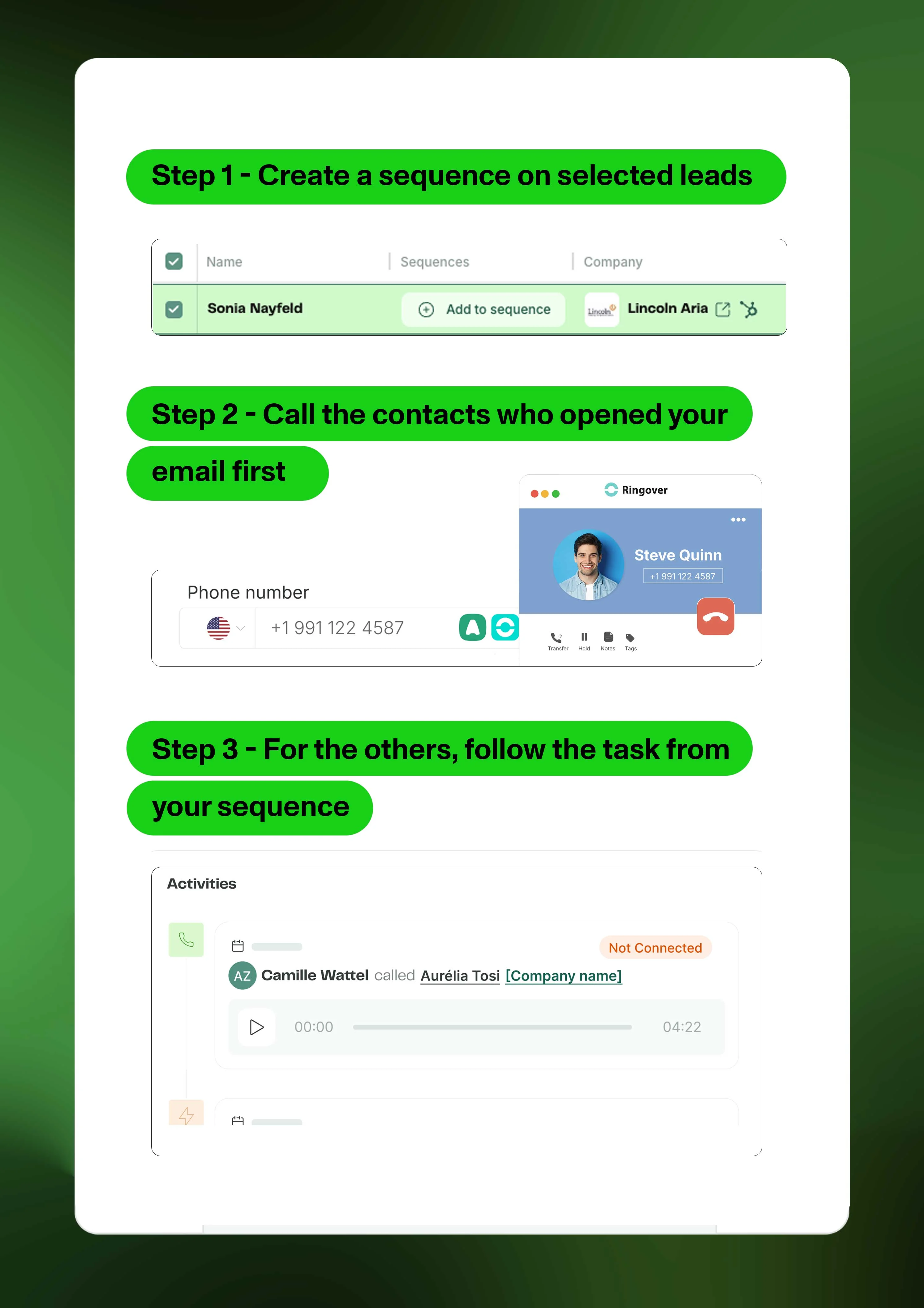
Go to Search. Find 80 contacts matching your ICP. Why 80? Because if 30% engage with your email or LinkedIn (standard benchmark), you'll have 24 warm leads ready to call. Plus 56 others who at least saw your name twice before you dial.
Add them to a new sequence. Name it something precise like "Warm call — May 2 — SaaS CFOs."
Build a 3-step warm-up sequence
Here's the cadence that works:
- Day 1 (April 25): LinkedIn connection request with a short note
- Day 3 (April 27): Email — 60 words max, one clear value prop, no meeting ask yet
- Day 7 (May 2, 10 AM): Call task
The call lands exactly when your name is still fresh but not annoying. They've seen you twice. If they opened your email or accepted your LinkedIn, they're interested.
Launch the sequence.
On calling day: prioritize email openers
May 2nd, 9:55 AM. Open your sequence dashboard.
Click "Filter" → "Email opened." Boom — 22 contacts light up. These are gold. They read your message. They're curious.
Call them first. Reference the email in your opening: "Hi Sarah, I sent you a note Tuesday about cutting invoice processing time — saw you opened it, wanted to chat for 2 minutes."
Instant credibility. No "cold" friction.
Once you've burned through the openers, move to the rest. Even if they didn't engage, they've seen your name. That's already 10x warmer than a blind dial.
Work through your task list without switching tabs
Head to "My Tasks" in Engage. Your calls are stacked in order — warmest first if you sorted right.
Click a contact. Call. Take notes in the card while talking. Hang up. Mark "Done." Next contact auto-loads.
No tab-switching. No "wait, who is this again?" Just call, note, next.
In 90 minutes, you'll clear 60-70 calls. If you prioritized openers, you're booking 6-8 meetings instead of 2-3.
💡 Using Aircall or Ringover? Plug it into Zeliq. You click the phone number, the call launches in your softphone, and every dial logs automatically in your CRM. Zero manual entry.