Pré-chauffez vos leads avant des les appeler

Améliorez votre niveau de jeu
D'un appel froid à un appel préparé avec Zeliq
Vous souhaitez contacter vos prospects avant de les appeler ? Pour qu'ils sachent qui tu es et pourquoi tu appelles ? Il s'agit d'une excellente stratégie pour augmenter le ratio de rendez-vous pris parmi tous vos appels connectés.
Et la bonne nouvelle, c'est qu'il est très facile à configurer grâce à Zeliq.
Il vous suffit de suivre ces étapes !
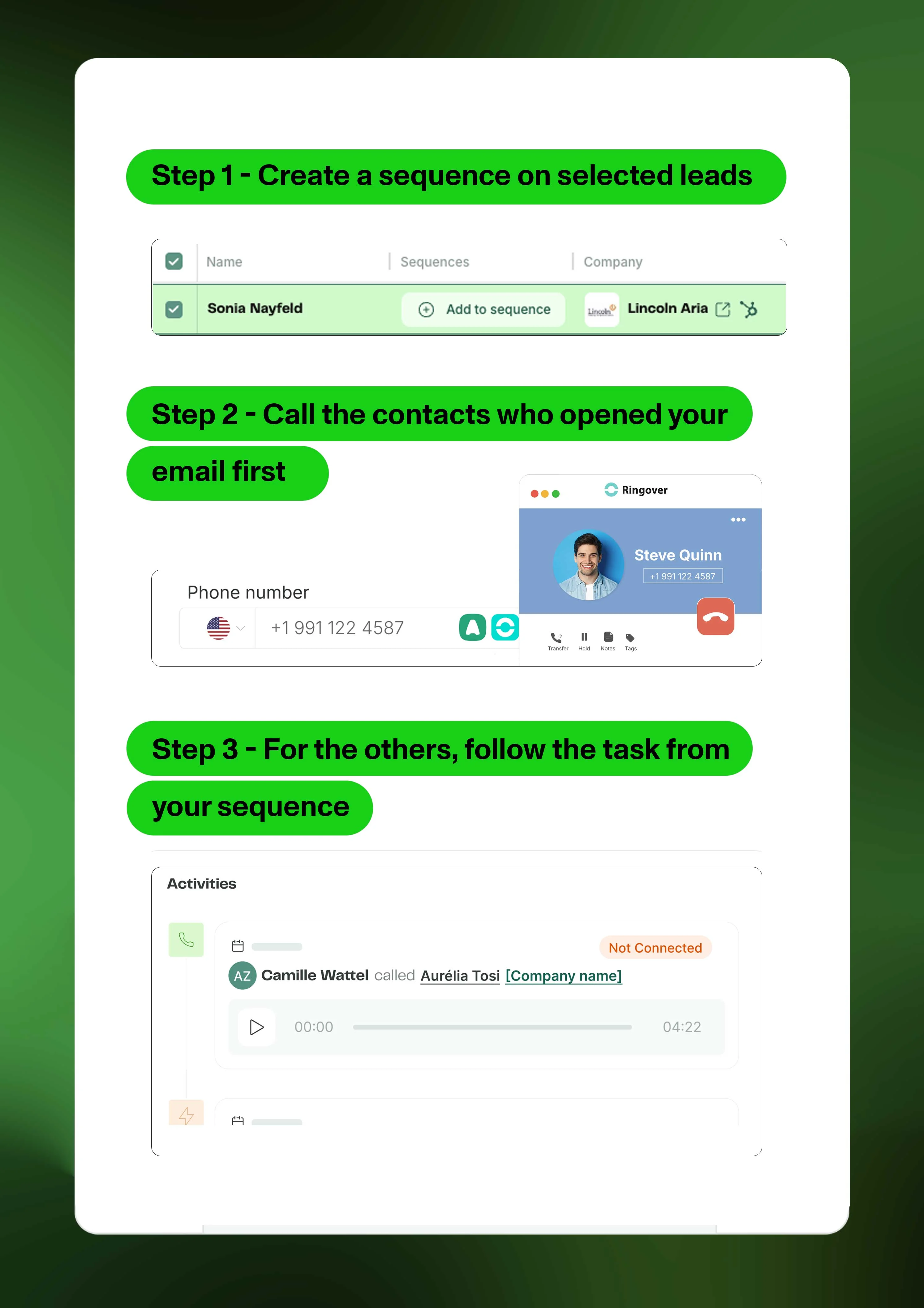
Étape 1 - Création d'une séquence sur les leads sélectionnés
1- Planifiez votre session d'appel une semaine à l'avance.
2- Trouvez vos contacts et ajoutez-les à une séquence.
3- Ajoutez une demande de connexion LinkedIn, un e-mail et une tâche d'appel. La tâche d'appel doit être placée le jour où vous souhaitez lancer un appel.
Étape 2 - Appelez les contacts qui ont ouvert votre e-mail en premier
1- Cliquez sur la séquence et filtrez par e-mail ouvert.
2- Ces prospects sont votre priorité absolue !
3- Assurez-vous de vous référer à l'e-mail lorsque vous les avez au téléphone.
Étape 3 - Pour les autres, suivez la tâche depuis votre séquence
1- Cliquez sur « Mes tâches » dans la section "Engager".
2- Traitez chaque tâche une par une, en vous assurant d'en prendre note lorsque vous êtes au téléphone.
3- L'appel est terminé ? Cliquez sur "Terminer" pour passer à la tâche suivante.
💡 Conseil de pro : Connectez Aircall ou Ringover si vous utilisez l'une de ces VoIP, afin de pouvoir continuer à démarrer l'appel depuis la page Zeliq et en suivre la trace.